
Rental Bookings
Commissionable Rentals
- Two-night minimum (unless noted in pink on rate calculator/in Call Center)
- Occasionally waived if there is a gap in inventory (ask VRD)
- HOA Payment Plan owners
- Can book rental only if they are eligible and willing to tour
14-Day Cancellation Policy
- Guest can cancel for a full refund outside of 14 days prior to arrival
- Non-refundable inside of 14 days
MGS: Marketing Guest Services
- Rental/MKTG
- Commissionable rental, booked by MGS
- Payment taken through PID
- Transfer to MGS for cancel/reschedule
- Block
- Non-commissionable rental
- Must remain in Main General
- Payment taken through PID
- Transfer to MGS for cancel/reschedule
- Contact Information
- Phone: 866.747.8544
- Email: marketingguestservices@breckenridgegrandvacations.com
Extranets or OTA’s (Online Travel Agency) are commissionable rentals booked through various channels of distribution.
The Type of OTA can be found in the “Notes” section of the reservation:
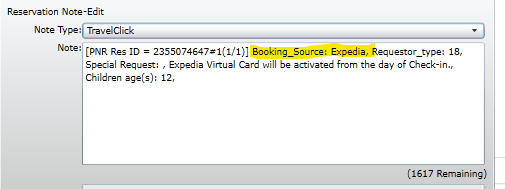
| Extranet | Channel | Commisionable | Payment Taken | Cancellations | Contact Information |
|---|---|---|---|---|---|
| Travel Click | Property Websites | Yes | Processed by VRD | 14-days, OS can process | |
| Expedia | expedia.com; hotels.com | Yes | Processed by VRD | OS cannot cancel, guest must speak to Expedia | 877.277.7481; 7 a.m.-6 p.m. |
| RFTS | Vail Resorts | Yes | Processed by Vail Resorts | OS cannot cancel, guest must speak to Vail Resorts | 888.617.0014; 8 a.m.-6 p.m. |
| AST | ski.com | Yes | Processed by AST | OS cannot cancel, guest must speak to AST | 800.908.5000; 7 a.m.-9 p.m. |
| HotelTonight | hoteltonight.com | Yes | Processed by HotelTonight | Non-refundable at time of booking | 800.995.6698; 24/7 |
| AirBnb | airbnb.com | Yes | Processed by Airbnb | OS cannot cancel, guest must speak to AirBnb | airbnb.com |
| VRBO | vrbo.com | Yes | Processed by VRBO | 14 days; OS cannot cancel, guest must speak to VRBO | 877.202,4291, vrbo.com |
| Booking.com | Booking.com | Yes | Processed by Booking.com | 14-days; guest must speak to booking.com to cancel | 888.850.3958 |
20% Discount : Owner20
25% Discount: Owner25
20% “Sales Rental” or RRF (reservation request form):
- Rental paid for by sales (to help close a deal, or substitute usage for a gap year)
- “Point-of-Sale” promise can be found:
- Worksheet note (owner file)
- Laserfische (Additional Considerations)
- Open RRF: No set dates, subject to availability within awarded season
- Closed RRF: Dates are specific; sales should confirm availability when selling
Flexibility:
- Different Season – ability to switch seasons depends on the rental value
- Lower-Value Season: book any season with a lower rental cost than the awarded season
- Higher-Value Season: book a more expensive season ONLY IF you adjust to keep the cost equal to or lower (fewer nights/smaller unit)
- Seasonal Grouping – seasons that are considered equal value and are 100% interchangeable (no reduction in nights/unit sizes needed)
- WINTER = Winter/Winter Value/Winter Prime
- SUMMER = Summer Value/Summer Prime
Policies:
- Best practice to book once we are inside 365 days from the arrival date (VRD exceptions apply based on the situation – just ask!)
- Cannot cancel or reschedule within 14 days
- Can bring dog to GL7 or GC8 regardless of where they own
- Owners cannot rent, deposit, or self-rent their RRF
How to Book:
- Open Call Center
- Search availability
- Set rate category to Package
- Select your property and dates
- Select “20% Sales RRF” rate option
- Finish booking through Call Center like any other rental
- Use fake CC#: 4444333322221111 exp 1/26
- Confirm Promotion is “RRF” in TSW
- Build rates from rate calculator with 20% discount – DO NOT USE BOTTOM SECTION!
- Use “Room (Including Clean Fee)” – Per Night amount
- Use “Resort Fee” total amount
- Do not add a separate clean fee
- Code entire balance of the reservation as a negative in the Rate Builder to PYMT-Sales Purchase GC8/GL7/GTL
- Code to the property the owner purchased
- Visit Cost in TSW should equal $0
- Match Room Folio to Incidentals
- Match Not For Guest Folio to Room Charges (confidential)
- Add and complete RRF note
- Update worksheet note on owner file
SRIF:
- Reservation booked during sale/upgrade with promise of taking an Open Res Tour during the stay
- Can be found:
- Worksheet note (owner file)
- Laserfische (additional considerations)
- Not commissionable rental (can only be booked into MG)
POLICIES:
- Can cancel/reschedule outside of 7 days
- If they cancel, change tour back to GC8 OPEN RES and add cancel note to tour res
- Can bring dog to GL7 or GC8
- Cannot deposit, rent, or self-rent
HOW TO BOOK RESERVATION:
- Search in TSW through owner’s reservation tab
- Select dates noted in worksheet note or requested by owner
- Closed SRIF should already be booked
- Reschedules can modify original reservation in TSW (remember to update the tour date)
- Res Type/Subtype: Owner/SRIF
- Promotion: SRIF
- Assign unit, cannot be overbooked
- Add notes:
- Blank note: “SRIF booked closed dates per contract”
- Tour no-show penalty note
- Rate Builder: no rates
- Update worksheet note in owner file
TOUR BOOKING:
- Look for the OPEN RES tour
- IF it is not already booked, use code “GC8SF.”
- Switch to “Booked”
- Select “Colorado”
- Select the date and time the guest is requesting
- Must be on the latter half of the reservation
- Add yourself as the “Booker.”
- Send confirmation email
- Attach tour ID to reservation
Comp Stays
- Complimentary stay with the clean and resort fee paid for by the department that offered the comp.
- Not commissionable rental
- Can only be booked into Main/General space.
HOW TO BOOK:
- Search availability and build reservation
- Book as Rental/Comp
- Rates:
- No room rate
- Clean fee (additional housekeeping page for the property- full clean)
- Resort fee (10% of clean, also found on additional housekeeping)
- Two folios
- Not for Guest (Room Charges)
- Guest Folio (Incidentals)
- Add Comp note explaining why this was booked
- Add “Dept Payment” transaction to folio
- Add department code in the reference field under payment
- If OR is comping a guest use 73820-150
- If for OR Agent use 75100-150 if approved by manager
- Add department code in the reference field under payment
POLICIES:
- Ok to cancel/reschedule anytime
- Cannot deposit, rent, or self-rent comp stays
All group bookings are now handled by VRD
POLICIES:
- Rental Rates
-
- 20% For Group Head
- 10% for all other group reservations
- Only 2 tours allowed per group*
- Cancellation Policy
- 5-9 Expected Reservations – 30-day cancellation
- 10+ Expected Reservations – 60-day cancellation
- *Keep in mind these are expected reservations, not the actual amount booked. We will always honor the quoted policy*
- Reservation Preferences
- We do not offer unit “Blocks.”
- No Guarantee that all reservations will be near each other
- Normal reservation preference policies apply
- We do not offer unit “Blocks.”
Who Qualifies for Tax Exempt Reservations?
- Government, Charitable, or Religious organizations
Required Documents:
- Current Tax Exempt Certificate
- Completed “Standard Colorado Affidavit of Exempt Sale”
- Payment must be made by the organization (Example: Must be placed on a credit card with the organization’s name on it)
- Someone who is planning to have their personal credit card reimbursed is not eligible for tax-exempt
- Government Credit Cards must complete the “Affidavit of Sales Paid By Gov. Credit Card” form
- All forms are retained for three years
**All Documents Must Be Received Prior To Booking**
- Customers can apply for a refund from the state/municipality if forms are not provided at the time of booking
Customer Explanation:
In order to comply with the majority of state and local sales tax law requirements, it is necessary that we have in our files a properly executed exemption certificate from all of our customers who claim sales tax exemption. If we do not have this certificate, we are obligated to collect the tax for the state in which the property is delivered. If you are entitled to sales tax exemption, please complete the certificate and send it to us at your earliest convenience. If you purchase tax free for a reason for which this form does not provide, please send us your special certificate or statement.
**Email All Attached Documents to VRD so we can save them on file**
Offering an exception to taking full payment at the time of booking is a tool you can use for closing rentals.
Add a note in special exceptions when booking in Call Center and add the SPECIAL PAYMENT note to the reservation.
Exceptions can include:
- 48-hour cancellation (outside of 7 days)
- 2-night deposit (full payment taken at 14 days)
- 50% deposit (full payment taken at 14 days)