
Tour Process
1. MAKE SURE THEY ARE QUALIFIED FOR PROMOTIONAL GIFTED TOUR
Owners
ALWAYS open Primary Customer to verify (review notes tab for NQ notes and Read Me First notes about tours)
- May tour every 6 months (check Lead tab to verify)
- Suspense Owners may not tour
- Pender Owners may not tour until their down payment is paid in full, unless their is approval from a sales manager.
- GTL S/F owners who have toured once after their GTL S/F purchase without purchasing will not be eligible for a gifted tour
- Must tour with significant other
- Check number in Grand Central
- After you search for owner, the number is to the right of their name
- Only 1 – 5 can tour for a gift
- 6’s cannot tour w/ a gift
*Not allowed to schedule a new tour, if owner has toured in last 30 days
**Exception to 30-Day & 6-Month Rule: If new purchase or upgrade is made, there’s only a 10-day grace period before an owner may book or tour again
Non-Owners
ALWAYS check for existing Customer File to verify (review notes tab for NQ notes and Read Me First notes about tours)
- May tour every 12 months (check Lead tab and requalify)
- Non-Owners may only tour twice without purchasing before they are no longer eligible for gifts.
- Must tour with significant other
- Singles must be widowed or divorced and make $150k+ or referred by an owner
*Not allowed to schedule a new tour, if guest has toured in last 30 days
First Timers
First Time Touring? (Non-Owners) See Additional Qualifying Questions Below:
*Must be at least 25 years old to qualify*
In-State Non-Owners (First Tour - Qualifying Questions)
In-State Non Owners: (Questions for first time prospects)
- Do you own or rent your home?
- Homeowners must make combined income of $125k+
- Non-Homeowners Exchange guests (must own home) must make combined income of $150k+
- Are you married or living with a partner?
- Must tour with significant other
- Singles must be referred by another owner, widowed, or divorced and make $150k+
- Are you local?
- Locals are not allowed to tour with gift
- Locals defined as: Breck, Dillon, Frisco, Silverthorne, Alma, Jefferson, Como, Fairplay (80424, 80435, 80443, 80497, 80498, 80420, 80456, 80432, 80440)
Out-of-State (First Tour - Qualifying Questions)
Out-of-State Non-Owners: (Questions for first time prospects)
- Do you own or rent your home?
- Homeowners must make combined income of $125k+
- Exchange guests must make $150k+ and own a home
- Non-Homeowners must make a combined income of $150+
- Homeowners must make combined income of $125k+
- Are you married or living with a partner?
- Must tour with significant other
- Singles must be referred another owner, widowed, or divorced and make $150k+
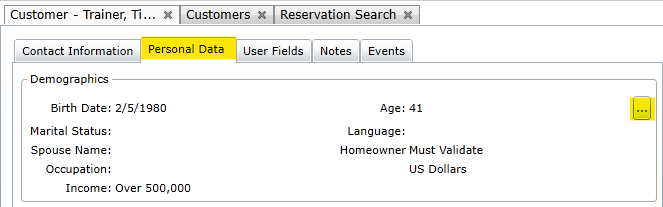
Add qualifications/demographics to the Customer File in the “Personal Data” tab by clicking […]
Group Tours
2 Tours Per Group Rules:
- 2 tours are allowed, at maximum, for any overlapping vacation dates (per group)
- All owners & owner referrals will be included in the “group” count
Quinn Tour
- A party of more than 2 people, typically families, who insist on touring together
- Normally booked as two tours with the same sales agent
- Friends tour with different sales agents due to financials
2. OFFER TOUR GIFT
Discounted Lodging
Res Calculator Chart for Applicable Discounts:
GC8 – 40% (Owner and Non-Owner)
GL7 – 40% (Owner and Non-Owner)
GTL – 40% (Owner and Non-Owner)
Lift Tickets and Golf Packages are the only gifts you may combine with discounted lodging. (Review Appropriate Toggle Chart)
VISA Gift Cards & BGV Certificates
NOT ALLOWED TO COMBINE with Discounted Lodging:

BGV Credit gifts can be applied immediately to any Bonus Time, Point Stay Fee, 2nd Partial Stay Fee, or Rental reservation
TSW Process :
- Insert into tour premiums in Tour
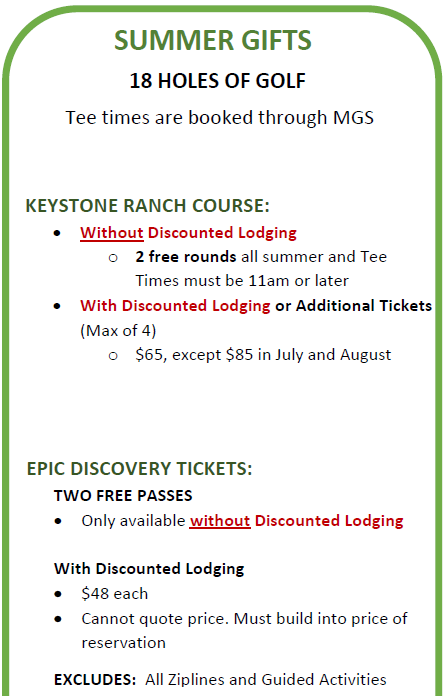
Summer Gifts (Golf & Discovery Passes)
Lift Tickets (ONLY applicable with Discounted Lodging)
- Valid for multi-person use –one ticket valid for one person and not interchangeable.
- Tickets expire shortly after pickup (7 days) – yes
- Valid at Breckenridge only
- No blackout days
- $130 per ticket through 4/15/23 and $100 per ticket 4/16/23 – Close
- Max of 8 per tour
- Pick-up from CONCIERGE or Sales Admin
Choose Gift Later
Tour guests may choose a gift at time of tour if they are uncertain. This will be limited to :
- VISA Gift Cards
- BGV Certificates
- Summer Gifts without discounted lodging
TSW TOUR PROCESS:
- Build tour like normal
- Under “PREMIUMS” section, select “Gift Choice”
3. CONFIRM TOUR DATE & TIME
- MUST CHOOSE A TOUR DATE (See Expanded Tour Scheduling Details)
- In a OneBGV effort, we need to make sure we always try to set the following guests up for an 8:30-9:30 tour. Data shows is that this will help these tours perform better.
- Owners: GC8 and GL7
- Non-owners:
- Instate Homeowners with income $125K+
- OOS Homeowners with income $200K+
- 3. SOMETIMES CHOOSE A TOUR TIME:
- If INSIDE 60 Days – Schedule Time using the Tour Scheduler
- Use “Tour Scheduler” A new window will open with a dropdown with available times.
- Save in the Scheduler and close window
- Close tour, do NOT click save and reopen tour to see time assigned in the “wave” seciton
- If 2-night stay and touring on day 2 tour MUST BE at 11 a.m. or after
- SOLO TOURS & EXCHANGE GUESTS must tour at:
- Summer, Spring, Fall – 12:00 or 12:30
- Winter – 11:30 or 1:30
- Use “Tour Scheduler” A new window will open with a dropdown with available times.
- If OUTSIDE 60 Days – Schedule Date. Don’t Schedule Time.
- Guest will be automatically be sent an email to choose time at the 60-day mark (confirm email on Customer File)
- If INSIDE 60 Days – Schedule Time using the Tour Scheduler
Tour Scheduling Details

4. QUOTE TOUR NO SHOW & RENTAL CANCELLATION POLICY
Quote the tour no show policy:
- “If you do not show up for your preview time, with your significant other, you will be charged the full amount of the reservation.”
Quote rental cancellation policy: (if applicable)
- “Cancellation Inside 14 days of arrival are completely non-refundable”
5. BUILD TSW RESERVATION
Audit Checklist:
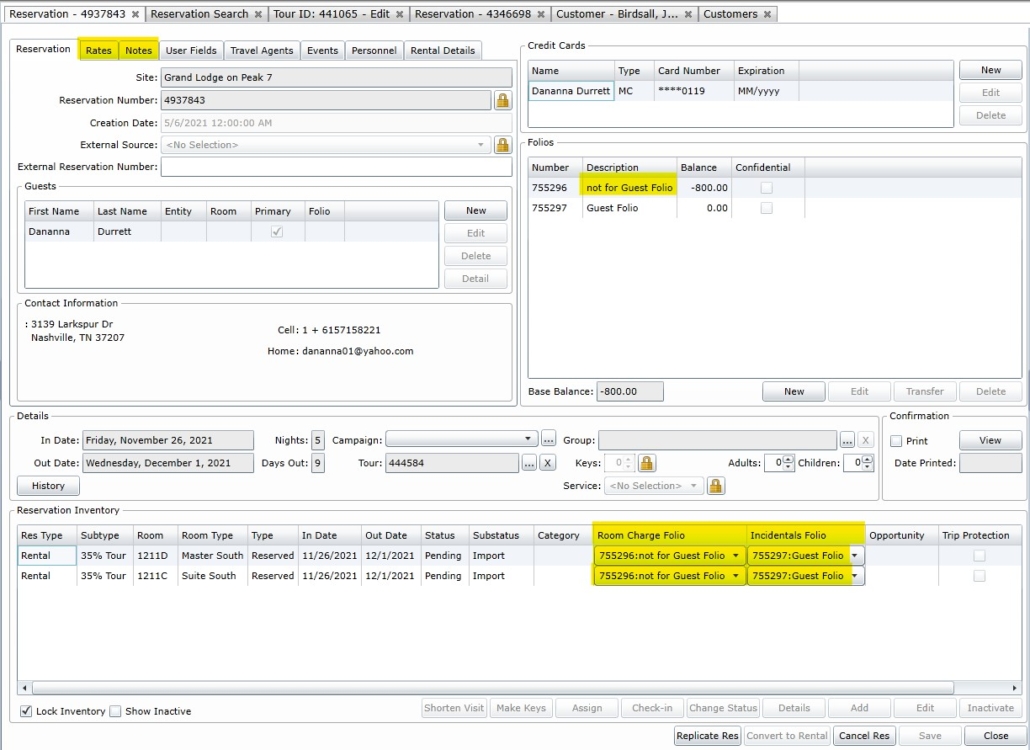
- Two Folios Created
- NOT FOR GUEST folio linked to “Room Charges”
- GUEST FOLIO linked to “Incidentals”
- Rate Builder
- Room rate, clean fee, resort fee
- Insert tour premium deductions (codes provided in tour calculator)
- If adding billable gifts such as lift tickets, golf, or discovery passes insert- TOUR PACKAGE PREMIUM – transaction code
- NOTES Added
- Rental Rez Note
- Travel Insurance
- Offered Update Tour
- Tour Policy Note
- Any other notes that are resort specific – dog friendly, etc.
- Add credit card to NOT FOR GUEST folio and Take Payment
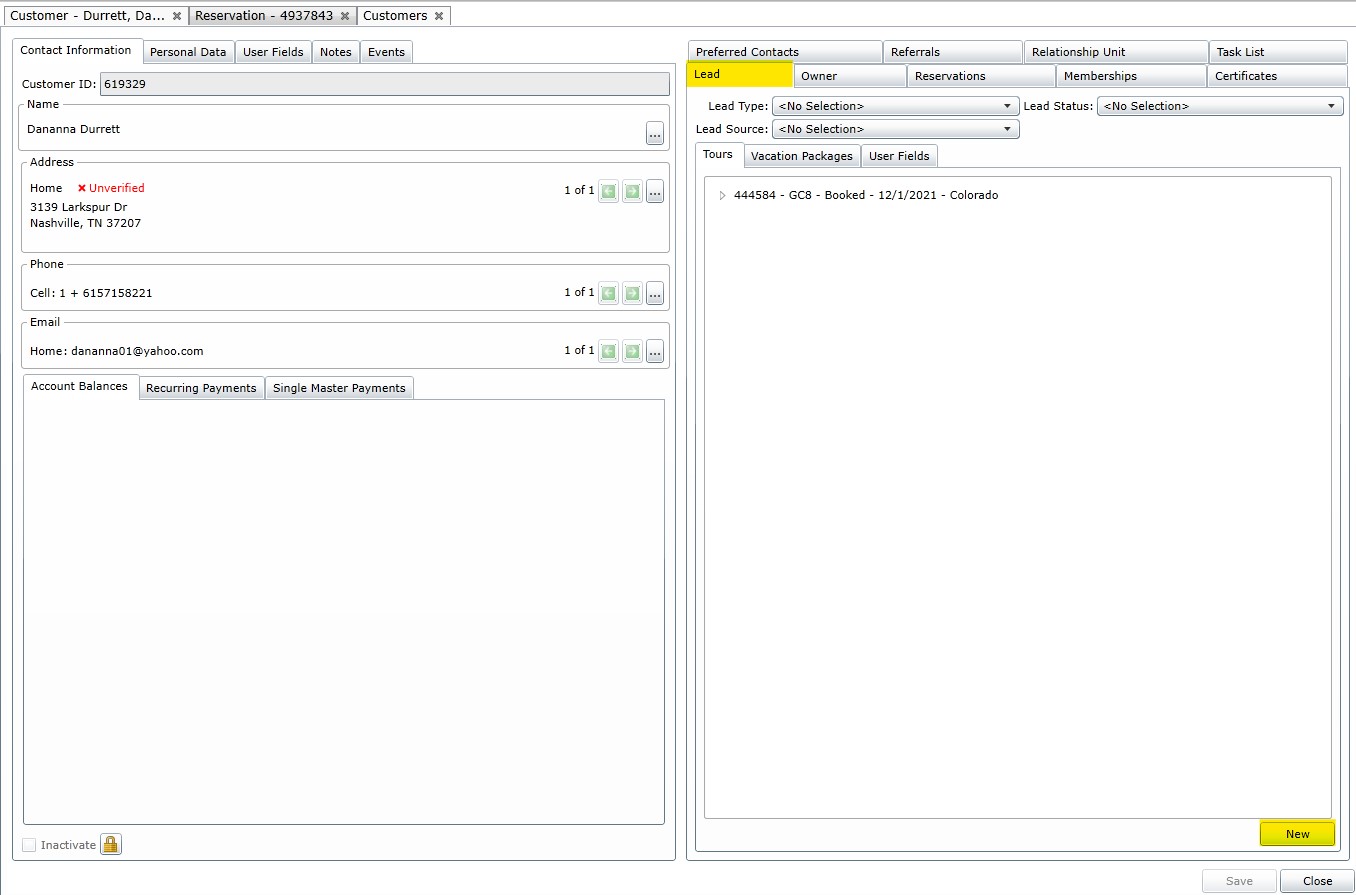
STEP 1: Insert Tour in Lead Tab
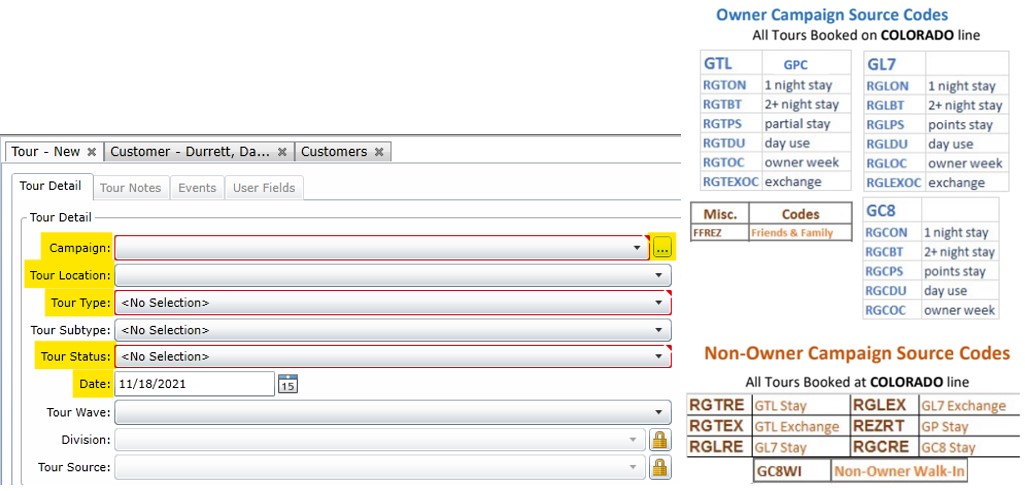
Refer to yellow highlights and complete following steps:
- Open Primary Customer File for owner or guest
- Click on the Lead tab
- Click on “New” to initiate tour booking
STEP 2: Build Tour
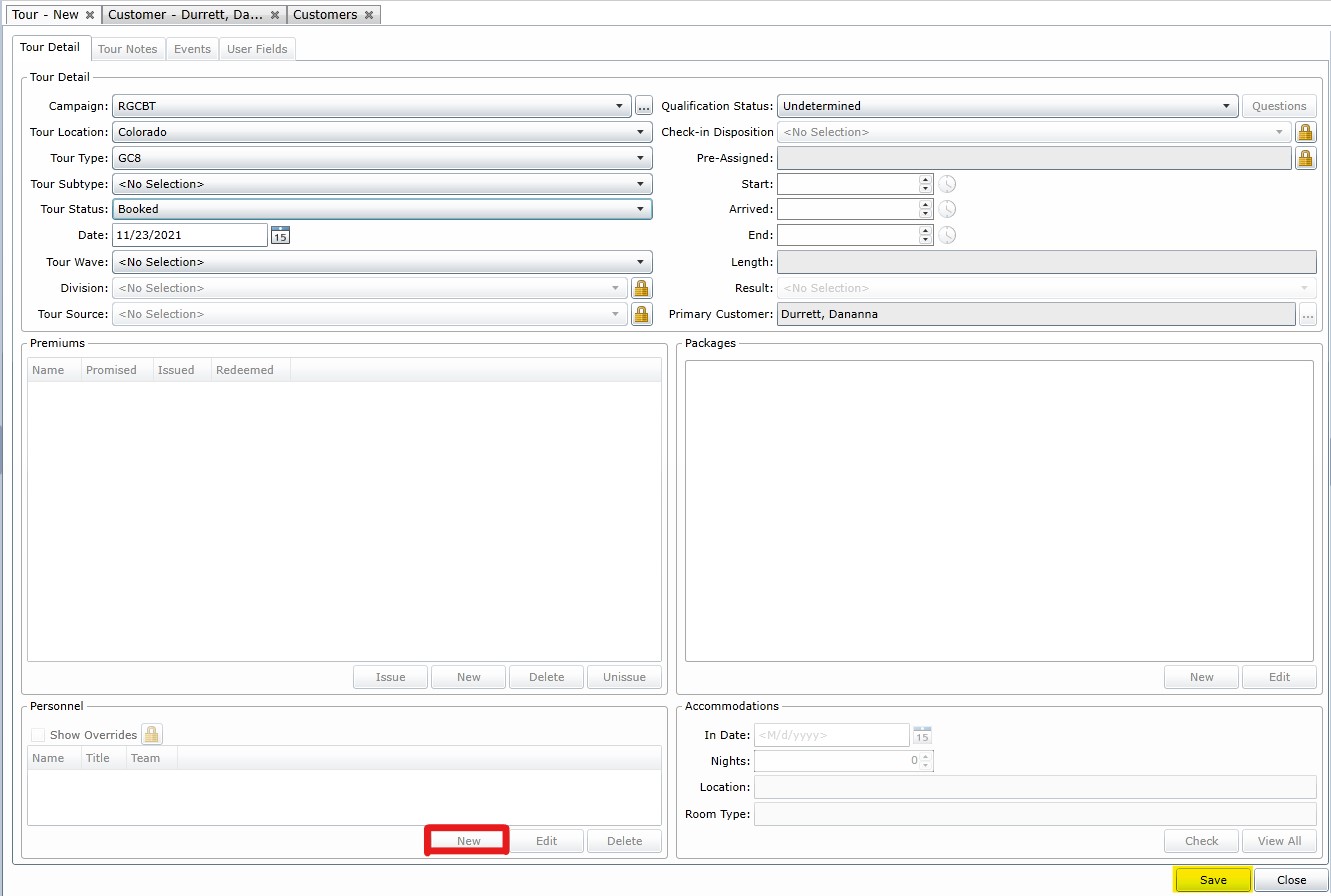
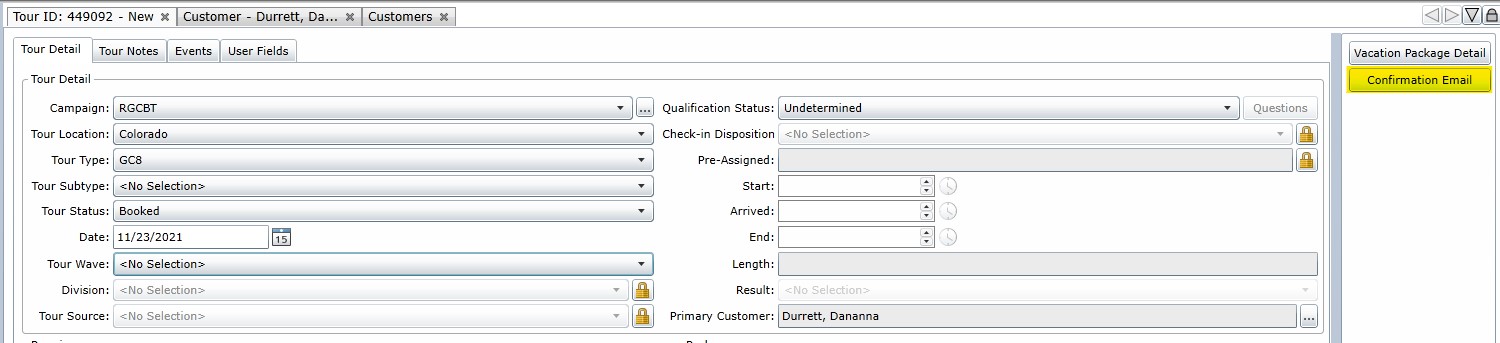
Work top to bottom, completing action items where you see yellow highlights.
Campaign = insert applicable campaign code using charts below
Location = Imperial
Type = GC8
Status = Booked
Date = date of tour owner agreed to (tour date rules)
SECOND to Final Step: Click Save at the bottom-right
New = click and add yourself as “Booker” (under Personnel)
STEP 3: Add All Touring Guests
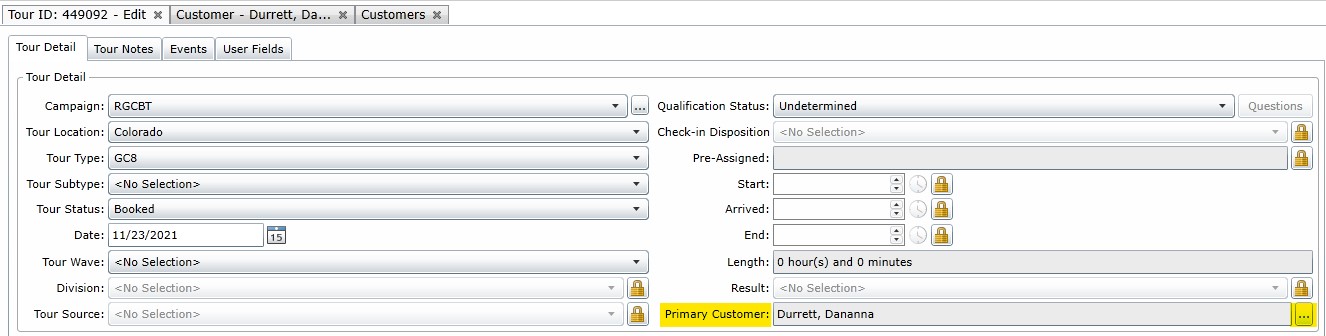
Adding All Touring Guests Required For Co-Owners, Spouses, Etc.!
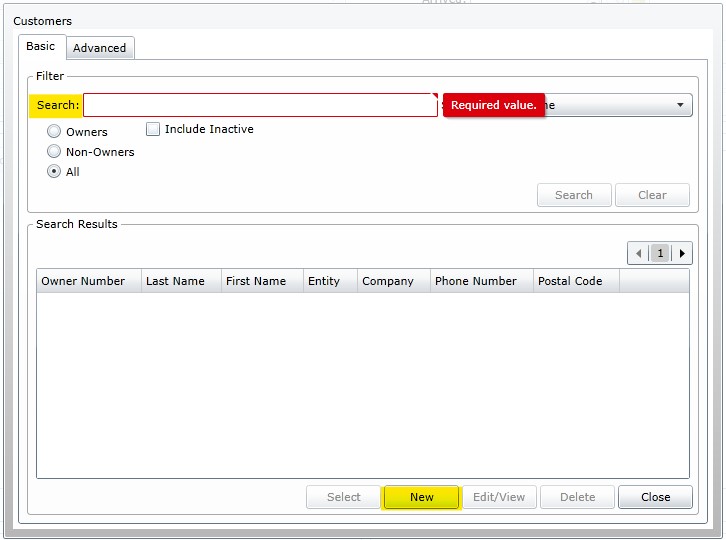
Step 1: Locate the “Primary Customer” field inside the tour, click the “[…]”
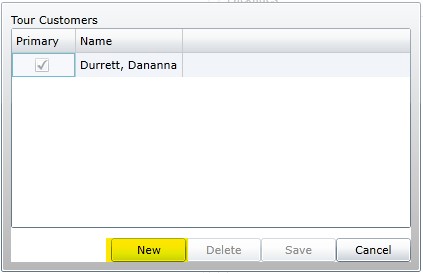
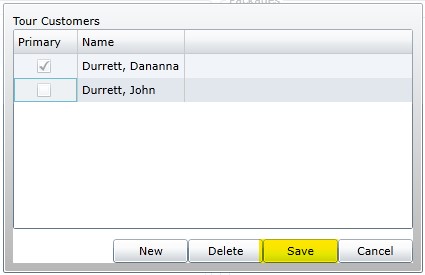
Step 2: Click “New” in Tour Customers pop-up screen
Step 3: Search for existing Customer File (co-owners) or click “New” for all others
Step 4: Click “Save” when all touring guests have been added
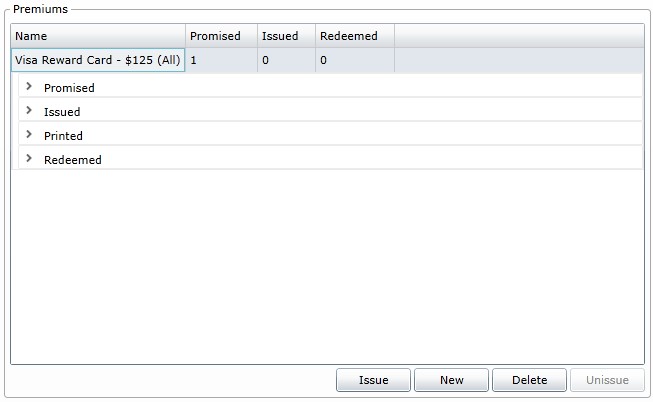
STEP 4: Add Premiums (If Applicable)
Premiums only required for Tour Gifts that guest will “pick-up” at Sales Gallery
(Example: gift cards and lift tickets)
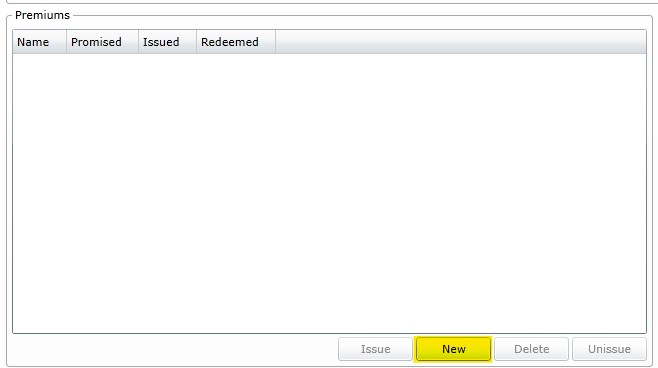
Step 1: Click NEW button inside of tour in Premiums section
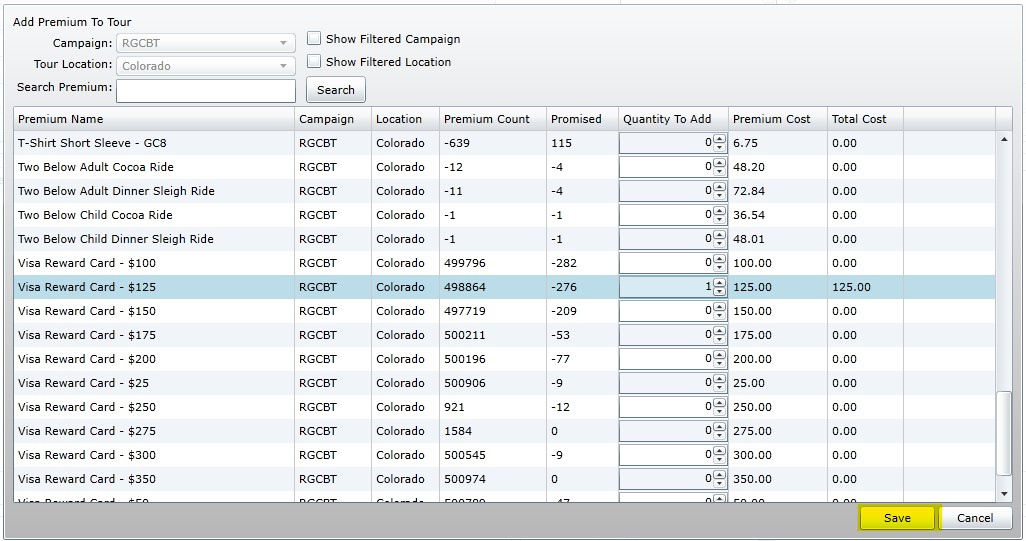
Step 2: Wait a moment while the CAMPAIGN & TOUR dropdown auto-loads
Step 3: Search and click on applicable gift and choose appropriate QUANTITY
Step 4: Click SAVE button
STEP 5: Choose Tour Time
Rules For Choosing Tour Time:
- If INSIDE 60 Days
- Use TOUR SCHEDULER
- Click CHOOSE PREVIEW TIME (May select any date or available time offered)
- If OUTSIDE 60 Days – guest will be automatically be sent an email to choose time at 60-day mark (confirm email on primary Customer File)

STEP 6: Link Tour, Add Note, Send Email
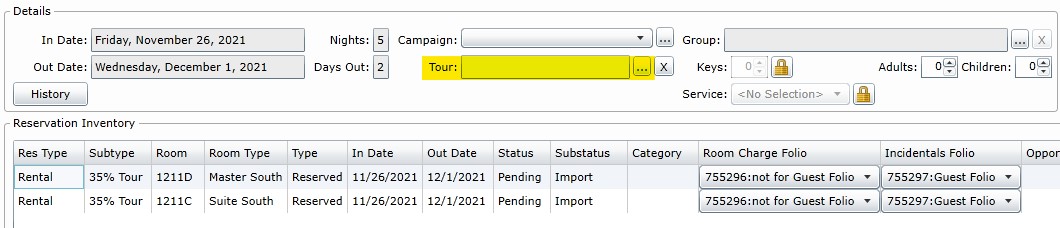
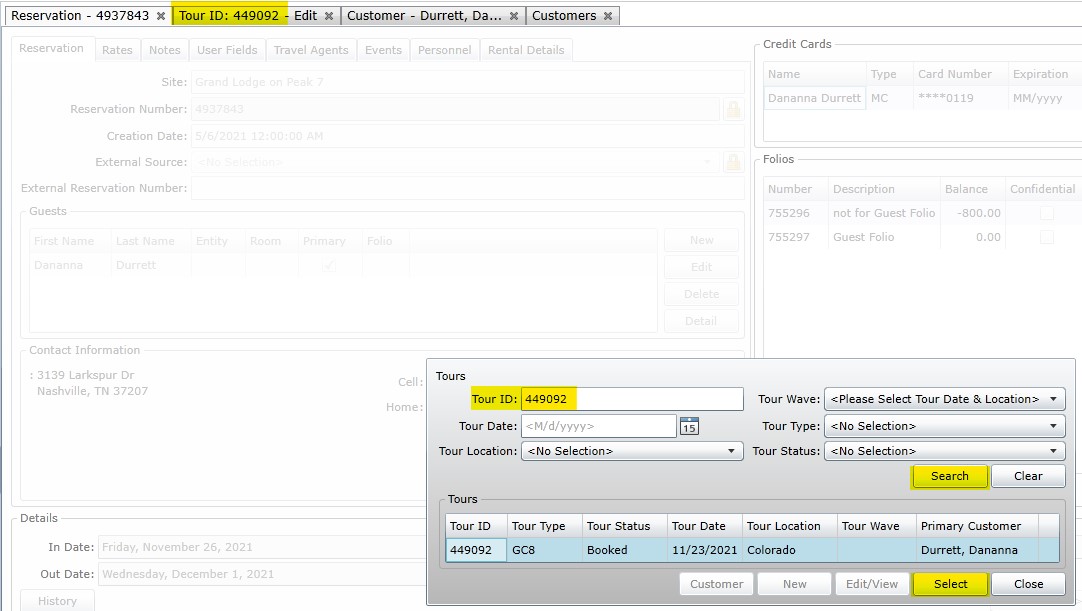
Step 1: Link Tour To Reservation
- Open Reservation
- Locate TOUR section (dead center of screen), click the “[…]”
- Type Tour ID, click SEARCH, verify Tour info, click SELECT
- Click SAVE on reservation
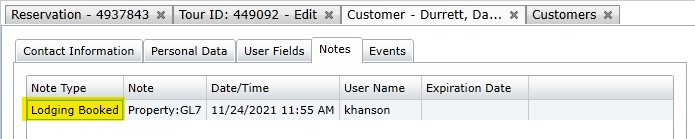
Step 2: Add Note
- Click Tour Notes (inside tour) tab and then click NEW
- Add Note – “LODGING BOOKED”
Step 3: Send Tour Confirmation Email
- Open Tour
- Click CONFIRMATION EMAIL button on the right-hand side
- Load Confirmation and Send to appropriate address
7. Cancelling a Tour
- Change “Tour Status” to “Canceled”
- Remove Tour Wave
8. Agent Payout
- $40 if they show up
- $40 more if they purchase