
RESERVATION RESOURCES
GIFT BASKETS
You can request Gift Baskets for owners and guests at no charge to them.
- Put the Gift Request Note in Reservation.
- Use code: 73820-150
- We will no longer do inter-office cards from our department
For adding Same-Day (SDA) gift baskets, you must let the Activities and Front Desk team know via email. Use this template:
- Subject Line: SDA Gift Basket
- Body (Copy Gift Basket Note):
- Guest Name:
- Rez #:
- Room #:
- Gift:
- Deliver On:
- Reason:
- Code:
- Card Written:
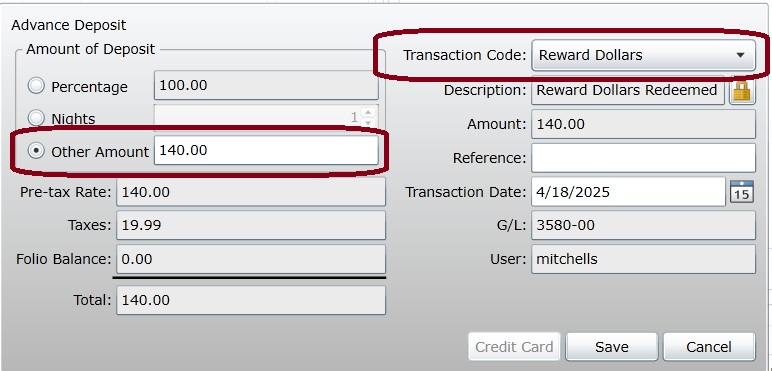
Inside the Reservation:
- Open Folio in Reservation
- Click “Advance Deposit”
- Transaction Code = “Reward Dollars”
- Check “Other Amount”
- Enter the Amount of Reward Dollars Being Used; Positive Amount
- Click “Save”
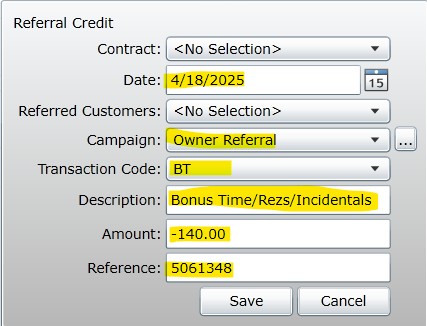
Inside the Owner File:
- Go to “Referrals”
- Click “New”
- Contract = “No Selection”
- Date of Charge
- Referred Customers = “No Selection”
- Campaign = “Owner Referral”
- Transaction Code = “BT”
- Description = “Bonus Time/Rezs/Incidentals” (auto populates)
- Amount = Amount Spent as NEGATIVE
- Reference = Reservation #
EMAILING FOLIO RECEIPT
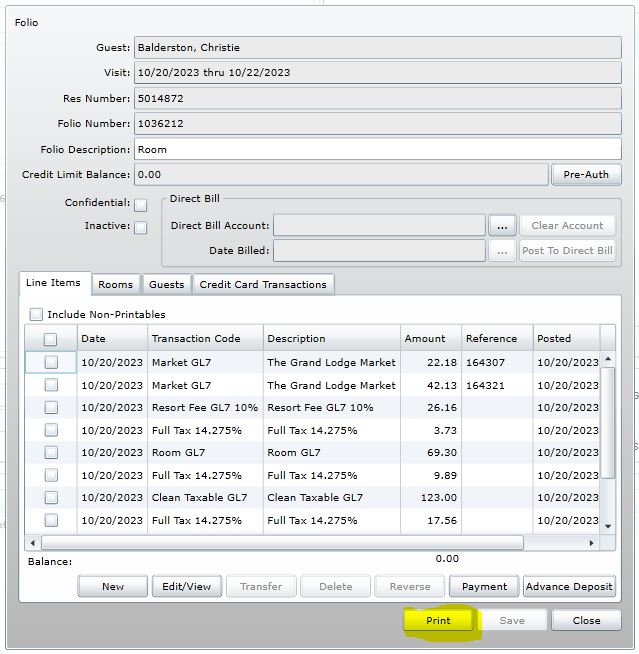
Steps:
- Find Reservation
- Open Folio by double-clicking
- Click Print
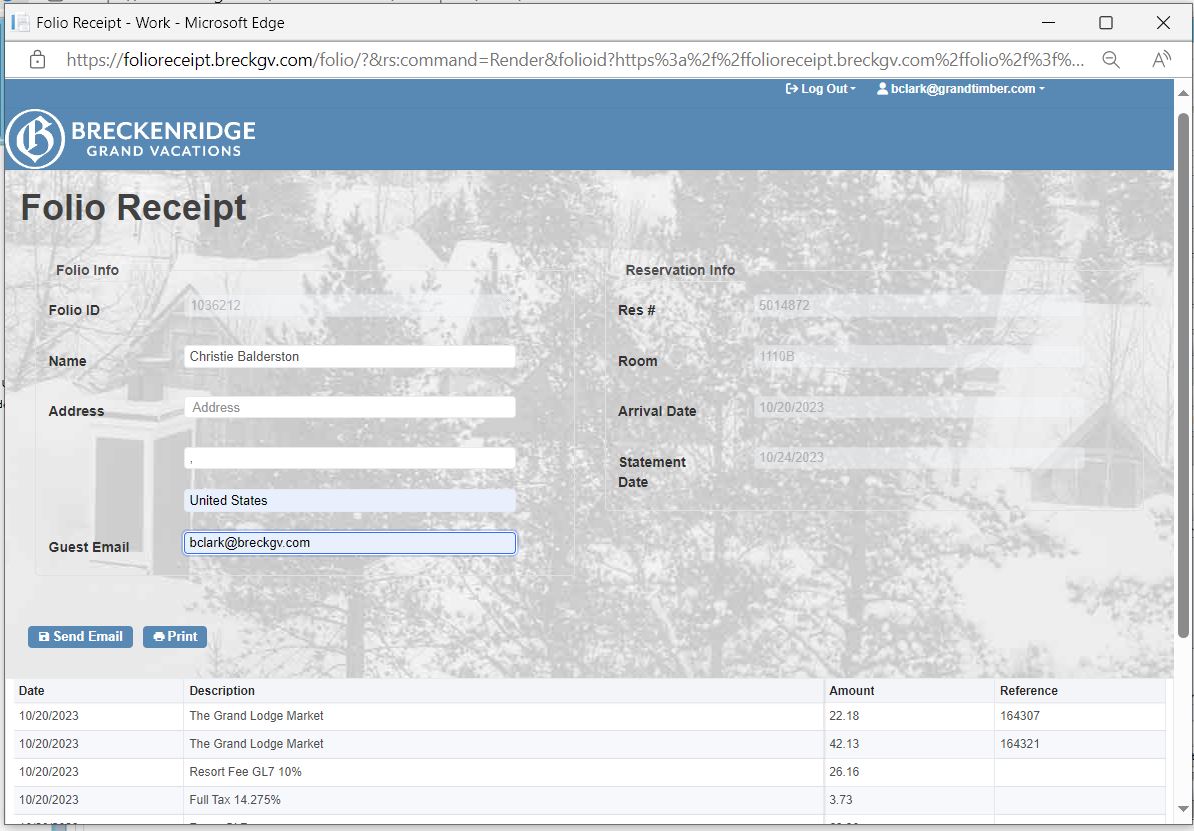
- Update contact information if needed.
- Click Send Email
EMAIL:
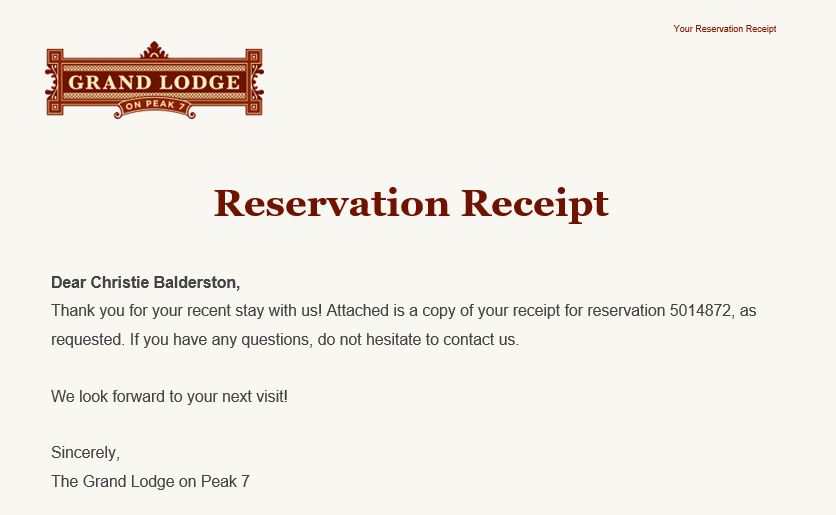
Subject: {Property} Reservation Receipt
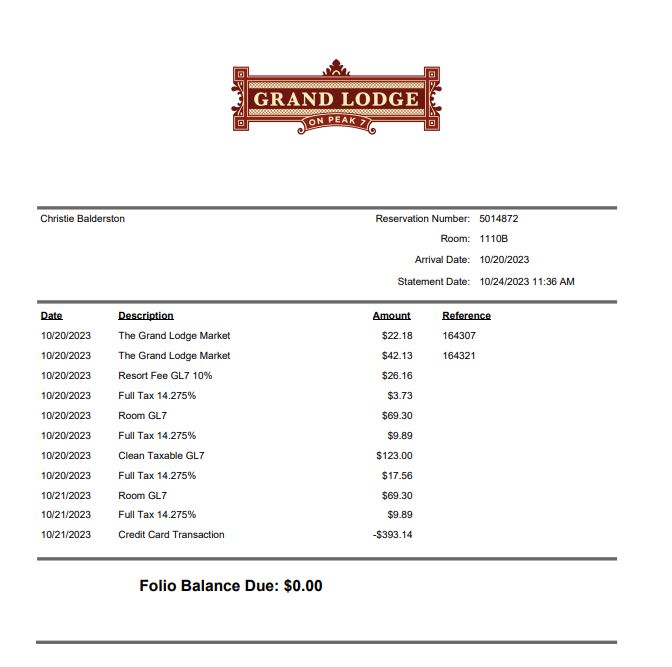
**Folio will be a PDF attachment to the email**
 Loading...

 Reload document
  Open in new tab
 | GTL | GL7 | GC8 |
|---|---|---|
| OWNER WEEKS:OWNER WEEK note Tour No Show Penalty (if applicable) First Stay note (if applicable) SDA (if applicable) |
OWNER WEEKS:OWNER WEEK note Dog Info – lock unit (if applicable) First Stay note (if applicable) SDA (if applicable) |
OWNER WEEKS:OWNER WEEK note Dog Info – lock unit (if applicable) First Stay note (if applicable) SDA (if applicable) |
| DEPOSIT:Deposited Week note | DEPOSIT:Deposited Week note | DEPOSIT:Deposited Week note |
| PARTIAL STAY:PARTIAL STAY note Tour No Show Penalty (if applicable) First Stay note (if applicable) SDA (if applicable) |
POINT STAY:POINTS POLICIES note Dog Info – lock unit (if applicable) Tour No Show Penalty (if applicable) First Stay note (if applicable) SDA (if applicable) Borrowed Points – copy to customer file (if applicable) |
POINT STAY:POINTS POLICIES note Dog Info – lock unit (if applicable) Tour No Show Penalty (if applicable) First Stay note (if applicable) SDA (if applicable) Borrowed Points – copy to customer file (if applicable) |
| BONUS TIME:BONUS TIME Note Tour No Show Penalty (if applicable) P+ Note (if applicable) First Stay note (if applicable) SDA (if applicable) |
BONUS TIME:BONUS TIME Note Dog Info – lock unit (if applicable) Tour No Show Penalty (if applicable) First Stay note (if applicable) SDA (if applicable) |
BONUS TIME:BONUS TIME Note Dog Info – lock unit (if applicable) Tour No Show Penalty (if applicable) First Stay note (if applicable) SDA (if applicable) |
| RACK, 10%, 20%, 25%, TOUR:RENTAL REZ Note Tour No Show Penalty (if applicable) Guest Total (if applicable) P+ Note (if applicable) First Stay (if applicable) SDA (if applicable) |
RACK, 10%, 20%, 25%, TOUR:RENTAL REZ Note Dog Info – lock unit (if applicable) Tour No Show Penalty (if applicable) Guest Total (if applicable) First Stay (if applicable) SDA (if applicable) |
RACK, 10%, 20%, 25%, TOUR:RENTAL REZ Note Dog Info – lock unit (if applicable) Tour No Show Penalty (if applicable) Guest Total (if applicable) First Stay (if applicable) SDA (if applicable) |
| USING OWN RENTAL:**Lock Inventory** Owner Back Note First Stay (if applicable) SDA (if applicable) |
USING OWN RENTAL:**Lock Inventory** Owner Back Note Dog Info (if applicable) First Stay (if applicable) SDA (if applicable) |
USING OWN RENTAL:**Lock Inventory** Owner Back Note Dog Info (if applicable) First Stay (if applicable) SDA (if applicable) |
Notes Glossary
| Note Type | Purpose |
|---|---|
| 24 CXL Offer | Whenever we book a reservation and offer the guest/owner the ability to cancel within 24 hours of booking. |
| Add Amenity Request | Owners and guests may request additional items such as additional humidifiers, extra towels, pillows, blankets, and additional kitchen items to be placed in their rooms. |
| Arrival Instructions | This is where you can put information for an early check in or if they are going to be arriving late |
| Dog Info | You put this note into the reservation anytime the owner is booked into a dog friendly unit and they are bringing a dog. Lock the reservation! |
| Do Not Move | You use this anytime you meet a request and do not want the reservation to be moved from a particular unit. Lock the reservation! Avoid using specific unit numbers, use descriptions of what they are looking for. |
| First Stay | You place this note in the reservation anytime an owner is staying on property for their first time. Also write a card and send a gift request. |
| Gift Basket | You use this note anytime you send a gift request to the activities department. |
| ADA | You place this in the reservation anytime a guest is requesting an ADA unit, you should also use the do not move if you are able to place them in an ADA unit. |
| Owner Info | Use this anytime you confirm owner info |
| Late Check-Out Request | Use this note when a guest requests a late check-out of 12 p.m. |
| Quoted NOT in DF Advisement | Use this note when an owner has requested a DF unit but we are currently unable to accommodate and have let the owner know that is the current status via phone/email. |
| Read Me First | Anytime you have something VERY important to say. This should be used to grab internal customer’s attention. |
| Dog Policy | Use this anytime you quote the dog policy |
| Rental Call Made | This should be used anytime you make a rental call or even ask an owner if they would like to place their unit up for rent |
| Rental Status | You should use this note anytime you quote whether an owners unit has been placed up for rent. |
| Room Move | You use this whenever someone has consecutive reservations but in two different units |
| Reservation Preference | Use this note when an owner/guest has a request and we are unable to accommodate the request. |
| Same Day Arrival | You use this note whenever someone makes a reservation that is checking in the day they made it. Also send an SDA email. |
| Special Occasion | You use this note whenever a guest is staying with us during a special occasion |
| Stayover | You use this note when someone has two reservations for consecutive nights in the same unit |
RESERVATION PREFERENCES
- Location Preferences – NEVER Guaranteed
- Floor level
- Room views
- Additional reservation(s) proximity
- Specific unit/room number requests
- Always ask, “What about this specific room do you like?
- Type Preferences – Guaranteed (once accommodated & quoted):
- Dog-Friendly
- Pure
- ADA
- Fixed/Fixed
Accommodating Requests
If you are ABLE to accommodate:
- Add “Do Not Move” Note
- If for Dog-Friendly, add “Dog Info” note
- Do Not Move not necessary if you have Dog Info note
- Lock Unit
- If applicable, remove the “Res Pref” note
If you are UNABLE to accommodate:
- Inside 48 Hours
- Ask VRD via teams
- Leave Res Pref or update BT Audit Note if unable to accommodate
- Example: “unable to accommodate- emailed VRD 2/26 (bclark)
- Outside 48 Hours
- Email: bgvvacationrentals-1c1514524593151@incontactemail.com AND vacationrentals@breckgv.com
- Update Res Pref Note or BT Audit note with the current status
- Example: “unable to accommodate/emailed VRD 1/18 (kjeffery)”
- If Applicable; add “Quoted NOT in DF” note if they are requesting Dog-Friendly
ROOM MOVES
- Room Moves happen when:
- We are unable to line up two reservations
- They have booked two different room types (ex. moving from a studio to a master)
- Owner/Guest will have to check out of reservation 1 at 10 a.m., and back in to reservation 2 at 4 p.m.
Steps:
- Add Room Move note to each reservation
- Include date of room move
- Lock both reservations
STAYOVERS
- Stayovers occur when we are able to keep the owner in the same unit for both reservations
- This happens when:
- Two separate reservation types but same unit size (ex. Bonus Time reservation followed by an Owner Week)
- Two different unit sizes but stayover in one portion (ex. moving from a suite to a two-bedroom, same suite for both nights)
- IMPORTANT: Same reservation types with the same unit size should be combined whenever possible (ex. two Bonus Time suites)
Steps:
- Add Stayover note
- Include date of stayover
- Lock both reservations
SAME DAY ARRIVALS
- If you book a reservation that checks in the same day, you should email the resort.
- Grand Central bookings will automatically send an email
Email:
- GC8: send to both *GC8FrontDesk and *GC8RQS
- GL7: send to both *GL7 Front Desk and *GL7RQS
- GTL: send to both *GTL Front Desk and *GTL RQS
Email Subject: SDA Res#
Email Body:
- Guest Name:
- Reservation #:
- Unit #
EARLY CHECK-IN
- Guest may request an early check-in at any time (never confirmed until day of arrival)
- Place ARRIVAL INSTRUCTION note in TSW reservation
- Add content to note in all caps: “EARLY CHECK-IN REQUEST”
- Include Estimated Time of Arrival
- Early check-in can ONLY be approved by Front Desk
- If the room is NOT ready, Front Desk will call or text guest when it is
- Guests are allowed to park and use amenities while room is being prepared (10am or after)
- Front Desk can hold luggage
LATE CHECK-OUT
- Add “Late Check-Out” Note to Reservation (property specific)
- Late check-outs are very limited and based on housekeeping schedules
- Latest check-out is 12 p.m.
Late Check-Out Fees:
- If staying in a 2bed or larger may vacate studio/suites and stay in Master until 12 p.m. to have only a $50 charge
- Front-Desk will add charges if approved.
CHARGES:
- Studios/Suites/1beds = $50
- 2beds/3beds = $100
- 4beds = $200
RESERVATION AMENITIES
When adding any amenity that is not standard to the room/reservation always add “Add Amenity Request” note to the reservation (Robes can be added through Res Profiles in Umbraco).
For a complete list of everything that can be added to a reservation, visit the property-specific Reservation Amenities pages:
RESERVATION CANCELLATIONS
- Owner usage cancelled inside of 60 days should be put on a COD hold by the agent canceling the stay.
-
Owner Weeks cancelled outside of 60 days do not need to be placed on hold. When an owner week cancellation email comes to VRD, they will accommodate any fixes needed with that availability or place the unit on overbooking hold. If we already have two overbooking holds, VRD will leave the unit open for booking. All point stays outside of 60 days should be placed on an overbooking hold.
- Rental Reservations will have a COD hold placed on the space every time a Rental is canceled.
-
We are not going to open point holds. You should feel free to open these for point stays only, when needed. Inside of 60 days, VRD can push any leftover points holds for rental.
Process:
- Review cancellation policies and make sure you are complying
- Leave “CXL Reservation” note in reservation
- To cancel: open reservation, click Cancel Res button (bottom right)
- Return owner usage if applicable
- Add a hold in the room matrix
- Overbooking hold: owner weeks, point stays
- COD hold: rental reservations
| Res Type | Policy | Comments |
|---|---|---|
| GL7 & GC8 Owner Week | No Fee | May reschedule where there is MAIN GENERAL space in deeded season |
| GTL Partial Stay | No Fee | May reschedule where there is MAIN GENERAL space in deeded season |
| GL7 & GC8 Point Stays | No Fee | May reschedule where there is MAIN GENERAL space in deeded season ($100 Admin Fee required for New Point Stay booking) |
| Rentals | Fully Refundable Outside of 14 Days | Non-refundable inside 14 days of arrival (48-hr cxl courtesy okay IF booked outside of 7 days of arrival) |
| Bonus Time | 48-Hour Cancellation | Non-refundable inside 48-hours of Arrival |
| OGE/GOC/VIP | No Fee | May reschedule outside of 14 days of arrival (Inside 14 days of arrival - no reschedules) |
| Comp Stay | No Fee | May reschedule outside 14 days of arrival - X units and MG only (Inside 14 days of arrival - no reschedules) |
| GTL Owner Week | No Fee | May reschedule where there is MAIN GENERAL space in deeded season |