
Self-Auditing
Owner Usage
Phone Disclosures:
- Owner Information – email, phone, etc.
- Offered Update Tour / Note + outcome (GTL only)
- If applicable: Dog Friendly Policy
- If applicable: Quoted Not DF Advisement / Note
- If applicable: Room assignments policy
- If applicable: Inventory Split and Re-assigned (GTL only)
Booking Owner Week on Grand Central:
- Log into Owner’s Grand Central page
- Select “Book Owner Week” under “Reservations”
- Select Property then Season you are booking
- Select a week from the available options and click “Reserve”
- Select “Checkout” if that is all you need to book
- Quote all policies from pop-up
- Agree to “Terms and Conditions”and add “Amenities/Additional Requests”
- Complete Reservation
- Go to Reservation in TSW, accommodate any additional requests
Always Audit:
- Notes
- Res Type / Sub Type
- Correct Amount of Days/Points and Year of Usage (Split for GTL)
- Main/General Inventory Used
- Correct building for check-in day
If Applicable:
- Dog Friendly/Pure Units/ADA
- Dog Info Note + Inventory Locked
- If applicable: Quoted Not DF Advisement / Note
- Reservation Preferences Honored (Customer File Pop-Up Notes)
- Do Note Move Note + Inventory Locked
- Stay Overs/Room Moves Reviewed
- Stay Over + Inventory Locked
Phone Disclosures:
- $100 Point Stays Admin Fee (6 nights or less or add a blank note that there is no fee for 7+ nights)
- Owner Information – email, phone, etc.
- Offered Update Tour / Note + outcome
- If applicable: Dog Friendly Policy
- If applicable: Quoted Not DF Advisement / Note
- If applicable: Room assignments policy
- If applicable: Comp’d admin fee on Google doc spreadsheet or code to OR
- If Comp’d: Build 2 folios “NOT FOR Guest Folio” and “Guest Folio”
- If Comp’d: Match NFGF to Room Charges and Guest Folio to Incidentals
Always Audit:
- Rate Builder and Credit Card Added
- Payment Taken
- Check-In Day is within 6 months
- Notes
- Res Type / Sub Type
- Correct Amount of Points/Days and Year of Usage
- Main/General Inventory Used
If Applicable:
- Dog Friendly/Pure Units/ADA
- Dog Info Note + Inventory Locked
- If applicable: Quoted Not DF Advisement / Note
- Reservation Preferences Honored (Customer File Pop-Up Notes)
- Do Note Move Note + Inventory Locked
- Stay Overs/Room Moves Reviewed
- Stay Over + Inventory Locked
Phone Disclosures:
- Full Clean Fee for 2nd Partial Stay
- Owner Information – email, phone, etc.
- Offered Update Tour / Note + outcome (2nd Partial Stay only)
- Cancellation & Reschedule Policy
- If applicable: Dog Friendly Policy
- If applicable: Room assignments policy
- If applicable: Inventory Split and Re-assigned
- If applicable: Comp’d admin fee on Google doc spreadsheet
Always Audit:
- Rate Builder and Credit Card Added (2nd)
- Payment Taken (2nd)
- Checks in/out on a Sunday (Bldg 5 or 6)
- Notes
- Res Type / Sub Type
- Correct Amount of Days and Year of Usage (split room if needed)
- Main/General Inventory Used
If Applicable:
- ADA
- Inventory Locked
- Reservation Preferences Honored (Customer File Pop-Up Notes)
- Do Note Move Note + Inventory Locked
- Stay Overs/Room Moves Reviewed
- Stay Over + Inventory Locked
Owner Week Rules
GL7/GC8 Booking Rules:
- First Tuesday (GL7) or Wednesday (GC8) inside of one year
- 3- and 4-bedroom owners may book one week earlier if booking the entire 3- or 4-bedroom unit.
- Multi-Week (multiple of the same unit size) can book on initial booking day and add consecutive weeks
GTL Booking Rules:
- Spring/Fall opens on one booking day (Saturday of week 16 of the year prior)
- GTL Summer/Winter participate in BiGVARS
- If they do not participate, owners may book their week after confirmations are sent.
Point Stay Rules
Standard Rules:
- $100 Admin Fee (6 nights or less add blank note that there is no fee for 7+ nights)
- 6 Month Booking Rule
- 2 Night Minimum
- If applicable: Comp’d admin fee on Google doc spreadsheet
Borrowing Points Policy:
- Must be an ANNUAL owner to borrow
- May only borrow if booking a reservation date inside 2 months of arrival
- By borrowing points, you will not have access to your full owner week the following year
- Add “Borrowed Points” Note to Customer File and reservation
Partial Stay Rules
Standard Booking Rules:
- 1st partial stay Free * 2nd partial stay charge full clean fee for unit size (each)
- Must checkout or check-in on a Sunday (Building 5 &6 only)
- 3 night & 4 night stay combinations only
- Must be booked into deeded season / unit size
- Inventory Split and Re-assigned (if necessary)
- 2nd partial stay should fill a gap in room matrix (currently omit
- If applicable: Comp’d admin fee on Google doc spreadsheet
Rental Reservations
Phone Disclosures:
- Owner Information – email, phone, etc.
- 48 Hour Cancellation Policy
- Offered Update Tour / Note + outcome
- If applicable: Dog Friendly Policy
- If applicable: Quoted Not DF Advisement / Note
- If applicable: Room assignments policy
Self Audit:
- Notes
- Res Type / Sub Type / Promotion
- Rates Match Calculator or BT App
- Payment Taken in TSW
- Dates are within BT parameters
If Applicable:
- Dog Friendly/Pure Units/ADA
- Dog Info Note + Inventory Locked
- If applicable: Quoted Not DF Advisement / Note
- Reservation Preferences Reviewed (Customer File Pop-Up Notes)
- Do Note Move Note + Inventory Locked
- Stay Overs/Room Moves Reviewed
- Stay Over + Inventory Locked
Phone Disclosures:
- Owner Information – email, phone, etc.
- Offered Update Tour / Note + outcome
- 14 Day Reschedule & Cancellation Policy
- If applicable: Dog Friendly Policy
- If applicable: Quoted Not DF Advisement / Note
- If applicable: Room assignments policy
- If applicable: 48 Hour Hold or Cancellation Policy
Self Audit:
- Notes
- Res Type / Sub Type /Promotion
- Rates Match Calculator
If Applicable:
- Dog Friendly/Pure Units/ADA
- Dog Info Note + Inventory Locked
- If applicable: Quoted Not DF Advisement / Note
- Reservation Preferences Reviewed (Customer File Pop-Up Notes)
- Do Note Move Note + Inventory Locked
- Stay Overs/Room Moves Reviewed
- Stay Over + Inventory Locked
Phone Disclosures:
- Owner Information – email, phone, etc.
- Offered Update Tour / Note + outcome=booked
- Touring w/ out a significant other penalty
- Tour No Show penalty
- 30 Day Reschedule & Cancellation Policy
- Tour Date Confirmed
- Tour Time Confirmed if Inside 60 Days
- If applicable: Dog Friendly Policy
- If applicable: Quoted Not DF Advisement / Note
- If applicable: Room assignments policy
- If applicable: 48 Hour Hold or Cancellation Policy
Self Audit:
- Checked for Co-Owners
- Notes
- Res Type / Tour Sub Type / Promotion
- Visit Cost = Tour Calculator Total (VRD if through TC)
- Reservation Confirmation Email Sent
- Tour Created in Customer File Lead tab
- Added Yourself as Booker
- Correct Campaign
- GC8/Colorado/Date
- Tour Time Scheduled (Inside 60 Days Only)
- Lodging Booked Note (in Customer File)
- Tour Email Sent
If Applicable:
- Dog Friendly/Pure Units/ADA
- Dog Info Note + Inventory Locked
- If applicable: Quoted Not DF Advisement / Note
- Reservation Preferences Reviewed (Customer File Pop-Up Notes)
- Do Note Move Note + Inventory Locked
- Stay Overs/Room Moves Reviewed
- Stay Over + Inventory Locked
- Payment Taken for All Lift Tickets, Golf Tickets, or Discovery Passes
- Rate Builder Code = TOUR PACKAGE PREMIUM
Self Audit:
- Review All Pop-up Notes (Honor Everything Possible)
- Dog-Info notes can be ignored if they did not select the “Dog” option online – proceed at your own discretion
- Check that Owner Owns @ Property Booked
- Rates Match Property and Unit
- Payment Taken in TSW
- Cross Reference CS Email for Special Requests and Amenities
- Check for other BT to combine reservations
- Add BT Check Note
- If Applicable:
- Dog Friendly/Pure Units/ADA
- Dog Info Note + Inventory Locked (If unable to accommodate, leave “blank note” explaining)
- If applicable: Not DF Advisement / Note (call and email)
- Reservation Preferences Reviewed (Customer File Pop-Up Notes)
- Do Note Move Note + Inventory Locked
- Stay Overs/Room Move Possibility Reviewed
- Stay Over + Inventory Locked
Added “Self Rental Note:
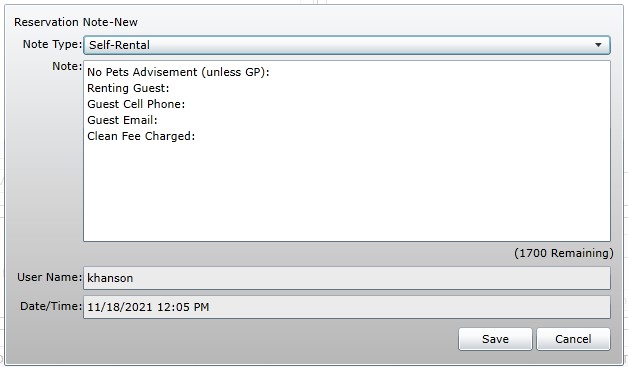
Updated reservation with information from the note prior to updating sub-type.
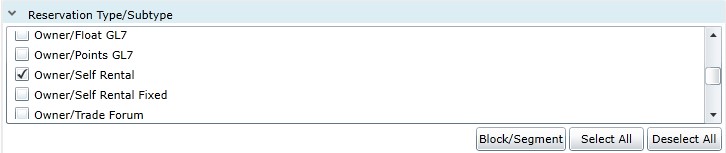
Updated sub-type to “Self Rental” or “Self Rental Fixed” if owner is renting a fixed week
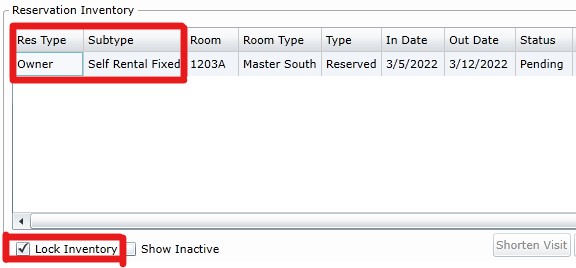
Lock fixed self-rental inventory
Set the renter as “Primary” and remove owner from the reservation
Charged clean fee and rate builder set to day of check-in so that the room is cleaned on appropriate day (if necessary)
Remove owner’s credit card
Misc Items
Why Do We Have Admin Fees?
The admin fee is intended to cover additional expenses associated with points stays, such as the overhead required to support points stay reservations (reservations, check-ins, etc.) as well as to help offset any additional cleans that may be needed
Self Audit:
- Add $100 Admin Fee to Rate Builder
- Add Comp Note to Customer File and Reservation
- Add NOT FOR GUEST folio
- Add to RRF for Comp Stays (Non-Sales) spreadsheet
Quick Definition: Comp stays are a FREE stay for a guest. (BGV pays for operational expenses)
Standard Rules:
- Look for availbility in MG or X unit (ask VRD for permission to use an X unit)
- UT is not ok
- May cancel or reschedule at anytime
- NOT allowed to rent unit or deposit with Interval
TSW Build:
- 2 Folios (NOT FOR GUEST & Guest)
- Rate Builder:
- No Room Rate
- Add Clean Fee + Resort Fee (as detailed on resorts
“additional housekeeping” page)
Add Notes:
- “Blank Note” in rez explaining why it was booked (Ex: per agent’s note in Customer File)
- “RRF Note”
- add rez to “RRF for Comp Stays & Tangible Gifts (Non-Sales Only)” google doc
Rules:
- Two robes are always placed in each unit. Owners and guests may request additional robes placed in their units, free of charge. Any robes missing upon check-out will incur a $100 fee.
- Requests from CS inbox are auto-added to reservation – no further action is required
- Day Use guests can rent robes for $5 per robe at the Concierge Desk
TSW Steps:
- If an Owner reaches out to add/remove robes do so through “Reservation Profiles” on Grand Central
- Add “Robes Requested” note with # of additional robes excluding the 2 already placed in the unit
Rules:
- Pack N Play’s are not allowed in studios or suites (fire code)
TSW Steps:
- Add Rate Builder Item: “Pack N Play”
- Date = Date Pack N Play Should Be Placed in Unit
- Charge = $0
- Add Note: “Pack N Play” (fill out template)
Tours
Phone Check & Disclosures:
Pre-qualify:
- Re-quailfy income and and home ownership (non-owners only)
- Marital Status/Co-Owners
- When was the last time guest toured?
- 6 month rule for owners
- 12 month rule for non-owners
- Has the owner toured in last last 30 days?
- Can’t schedule new tour until 30 day grace period expires
Reservation Disclosures:
- Owner Information – email, phone, etc.
- Offered Update Tour / Note + outcome=booked
- Touring w/ out a significant other penalty
- Tour No Show penalty
- 30 Day Reschedule & Cancellation Policy
- Tour Date Confirmed
- Tour Time Confirmed if Inside 60 Days
- If applicable: Dog Friendly Policy
- If applicable: Quoted Not DF Advisement / Note
- If applicable: Room assignments policy
- If applicable: 48 Hour Hold or Cancellation Policy
Self Audit:
- Check for Co-Owners
- Notes
- Res Type / Tour Sub Type /Promotion
- Visit Cost = Tour Calculator Total
- Reservation Confirmation Email Sent
- Tour Linked to Rez
- Tour Created in Lead
- Added Yourself as Booker
- Correct Campaign
- GC8/Colorado/Date
- All touring guests added
- Tour Time Scheduled (Inside 60 Days Only)
- Lodging Booked Note – in customer file
- Tour Email Sent
- 7 Day Rule Reviewed
- If a tour was canceled in last 7 days, previous booker gets credit for tour
If Applicable:
- Dog Friendly/Pure Units/ADA
- Dog Info Note + Inventory Locked
- If applicable: Quoted Not DF Advisement Note
- Reservation Preferences Reviewed (Customer File Pop-Up Notes)
- Do Note Move Note + Inventory Locked
- Stay Overs/Room Moves Reviewed
- Stay Over + Inventory Locked
- Payment Taken for All Lift Tickets, Golf Tickets, or Discovery Passes
- Rate Builder Code = TOUR PACKAGE PREMIUM
Phone Check:
- Re-quailfy income and and home ownership (non-owners only)
- Confirm email address
- When was the last time guest toured?
- 6 month rule for owners
- 12 month rule for non-owners
- Has the owner toured in last last 30 days?
- Can’t schedule new tour until 30 day grace period expires
- Confirm Preferred Gift
- Confirm Tour Date
- If inside 60 days, confirm tour time
- If outside 60 days, guest will receive email to schedule
Self Audit:
- Tour Created Under Guest PID
- “Day Use” Campaign Code Used
- Premiums Added to Tour
- Tour Time Scheduled (Inside 60 Days Only)
- Tour Confirmation Email Sent
- 7 Day Rule Reviewed
- If tour was cancelled in last 7 days, previous booker gets credit for tour
Standard Rules:
- Only available with discounted lodging stays
- Cannot combine 4 Packs with Single Day Tickets
- Must pay at time of booking
- Cannot add tickets at later time
TSW Steps:
- Add Rate Builder Item “Tour Package Premium”
- Date = Date of arrival
- Cost = Total Cost of Combined Ticket Purchase
Phone Disclosures:
- Broker Meeting Required During Stay
- Confirm Date of Tour
- Must Complete Tour with Significant Other
- Offered Update Tour / Note + outcome=GM Exit
- Cancellation & Reschedule Policy (Only allowed outside 30 days of arrival)
- Remind Guest of Two Free Activities
Self Audit:
- Notes
- Res Type / Tour Sub Type
- Visit Cost = Tour Calculator Total
- Reservation Confirmation Email Sent
- PID Linked to Rez
- OPEN EXIT Tour Updated in PID
- Added Yourself as Booker
- Accommodations added
- Tour Time Scheduled (Inside 60 Days Only)
- Res Note and Email Sent Note
- Tour Email Sent
If Applicable:
- Dog Friendly/Pure Units/ADA
- Dog Info Note + Inventory Locked
- If applicable: Quoted Not DF Advisement Note
- Reservation Preferences Reviewed (Customer File Pop-Up Notes)
- Do Note Move Note + Inventory Locked
- Stay Overs/Room Moves Reviewed
- Stay Over + Inventory Locked
Cancellations
Rules for Owner:
- No Cost for Rescheduling or Cancelling
Cancellation Process:
- Cancel Reservation via “Reservations Menu”
- Add note to rez: “CXL Reservation”
- Provide first and last name of guest who requested cancellation
- If inside 30 days of arrival:
- Place Unit on DO NOT BOOK APP
- Insert Overbooking Hold
- Notify VRD of Hold via email
Phone Disclosures:
- No cost for cancelling or rescheduling
Cancellation Process:
- Cancel Reservation via “Reservations Menu”
- Add note to rez: “CXL Reservation”
- Provide first and last name of guest who requested cancellation
- If inside 30 days of arrival:
- Place Unit on DO NOT BOOK APP (If inside 14 days)
- Insert Overbooking Hold
- Notify VRD of Hold via email
Phone Disclosures:
- No cost to cancel or reschedule
Cancellation Process:
- Cancel Reservation via “Reservations Menu”
- Add note to rez: “CXL Reservation”
- Provide first and last name of guest who requested cancellation
Rules for Owner:
- No Cost for Rescheduling or Cancelling
Cancellation Process:
- Cancel Reservation via “Reservations Menu”
- Add note to rez: “CXL Reservation”
- Provide first and last name of guest who requested cancellation
Standard Rules:
- Fully Refundable Outside 14 Days
- Non-Refundable Inside 14 Days
- 48 Hour cancellation courtesy always okay outside 7 days of arrival
Cancellation Process:
- Add note to rez: “CXL Reservation”
- Provide first and last name of guest who requested cancellation
- If inside 14 days of arrival (with VRD/MGR approval):
- Place Unit on DO NOT BOOK APP
- Cancel Reservation via “Reservations Menu”
- Always:
- Cancel Reservation via “Reservation Menu”
- Insert COD HOLD
- Notify VRD of Hold via email
Standard Rules:
- No Fee for Cancellations
- May Reschedule Outside 14 Days of Arrival
Cancellation Process:
- Add note to rez: “CXL Reservation”
- Provide first and last name of guest who requested cancellation
- If located in an X Unit:
- Place Unit on DO NOT BOOK APP
- Cancel Reservation via “Reservations Menu”
- Insert Usage HOLD
Standard Rules:
- May Reschedule Outside 14 Days of Arrival
Cancellation Process:
- Add note to rez: “CXL Reservation”
- Provide first and last name of guest who requested cancellation
- If inside 14 days of arrival (with VRD/MGR/Deanna approval):
- Place Unit on DO NOT BOOK APP
- Cancel Reservation via “Reservations Menu”
- Always:
- Cancel Reservation via “Reservation Menu”
- Insert COD HOLD
- Notify VRD of Hold via email
Breckenridge Grand Vacations
Owner Support: 877-453-4440
1625 Airport Road, Breckenridge, CO 80424
Breckenridge Grand Vacations is not affiliated with Vail Resorts or any of Vail Resorts’ subsidiaries.
OUR FAMILY OF RESORTS
Imperial Hotel and Private Residences
Grand Colorado on Peak 8
Grand Lodge on Peak 7
Grand Timber Lodge