
CONTRACT PURCHASES & PROVISIONS
Hours: Monday-Saturday 9 a.m. – 5 p.m.
Best Way to Contact: Email
- contracts@BreckenridgeGrandVacations.com
- Process: email Contracts group with the owner’s request, best email, and phone number
Contracts Handles:
- Quit Claim Deed
- Warranty Deed
- Release of Deed of Trust
- Contract Status: Pender, Mail Out, and Needs Paperwork
| CONTRACT STATUS | GRAND CENTRAL ACCESS | ACTION | CAN MAKE RESERVATONS | Status Details |
|---|---|---|---|---|
| Suspense | No | Transfer to NOW | No | The owner’s new contract is within the five calendar day rescission period in which they can still back out of the contract. Transfer to New Owner Welcome line. |
| Pender | No | Transfer to NOW | No | Owner has not submitted the complete down payment to us yet; can still back out of the contract with no refund of what has been paid. |
| Mailout | No | Transfer to NOW | No | We’ve mailed out the contract to the owner to sign/return back to us |
| Pipeline | Yes | Take the Call | Yes | We’ve received all the correct paperwork – just need to review the contract – you may book for them |
| Needs Paperwork | No | Transfer to Contracts | No | Needs to return additional/skipped paperwork back to us Transfer to Contracts |
| Not Back/Not Back | No | Transfer to Contracts | No | Owners forgot to sign a sheet or had to leave in the middle of signing, or something wasn’t finalized. Paperwork is not complete! Not allowed to do anything with their ownership. |
| Future CXL | Yes | Take the Call | Yes | This contract will be fully active until the status of the newest purchased contract is in place. Once the newest purchase is able to be used, this contract will be canceled |
Imperial Option Contract Statuses with Grand Central Access
| Contract Status | Contract Substatus | Grand Central Access |
|---|---|---|
| Imperial Option | Active | Yes |
| Imperial Option | Pipeline | Yes |
| Imperial Option | Future CXL | Yes |
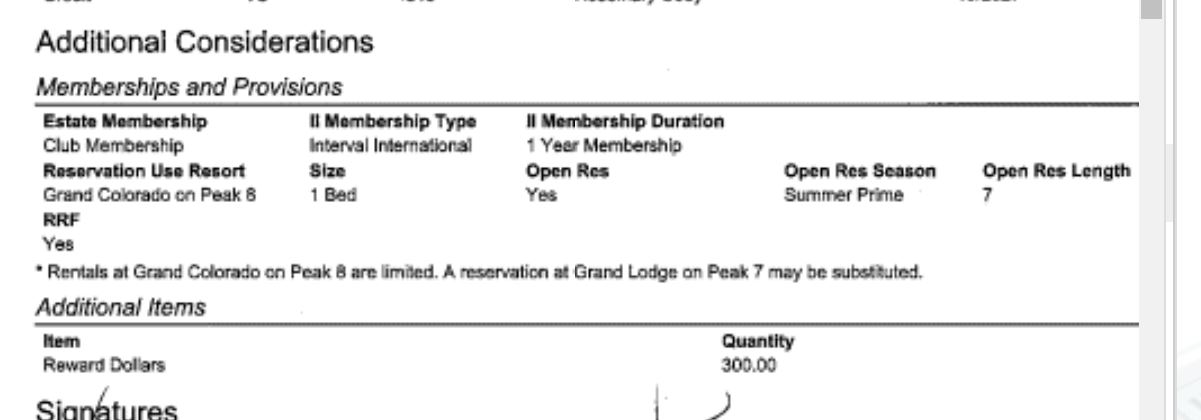
ADDITIONAL CONSIDERATIONS
- “Extras” that some owners receive with their contract purchase are displayed on the worksheet of an ownership contract in the Additional Considerations section.
- Typically, additional considerations are added to a Worksheet note in the primary customer file
Examples:
- RRF (rental in lieu of owner usage)
- External term to be used with owners: “Sales Rental”
- Interval extras [developer weeks, accommodation certificates (bonus weeks), etc.]
- Branded swag (jackets, skis, etc.)
- Epic Passes
- Reward Dollars
WORKSHEET NOTES
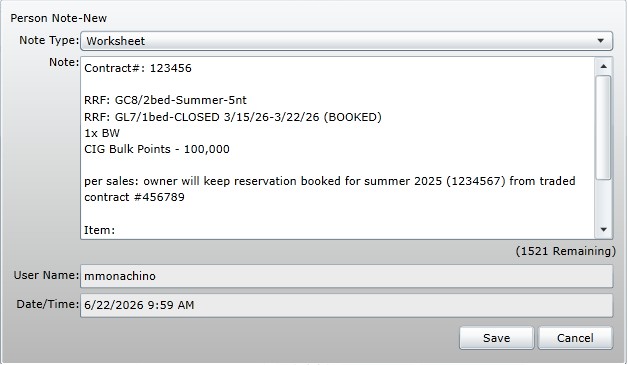
If a worksheet note has not yet been created for a contract that includes additional considerations, please add one to the primary owner file and list all gifts on the contract.
What to include
- RRFs
- Accommodation Certificates (Bonus Weeks)
- CIG Points / Developer Weeks
- Any notes from sales with special instructions for retaining usage from a traded week
When to update
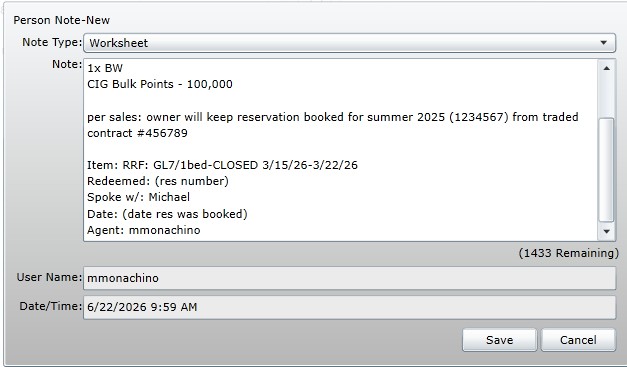
Make sure to update worksheet notes any time a gift is:
- redeemed
- adjusted/modified
- cancelled
- comped/replaced
*please note any exceptions made or quoted to an owner as well, be detailed!*
Worksheet Note Examples:
EPIC PASSES
Owners will occasionally receive Epic Passes with their contract purchase.
For inquiries:
- OR: Email Russel Navales at rnavales@breckgv.com and CC bgvpassinquiries@breckgv.com
- ALWAYS send an email with the owner information (name & owner #) and what they were inquiring about
- Owners: Email bgvpassinquiries@breckgv.com
- 970-453-3350 can also assist
FREQUENTLY ASKED QUESTIONS
When will I know my pass has been purchased? Once Breckenridge Grand Vacations places the order, the Vail Resorts pass office manually processes this order and it may take the pass email confirmation 4-8 weeks to be sent.
I never got an email confirmation from Vail Resorts. Often this email confirmation goes into the junk inbox; start by checking there.
Once your pass has been purchased you will not be permitted to cancel it or move it to a different year.
I put down a deposit. Will I be refunded? Cancel your auto renewal immediately. Cancel your $49 deposit. Please contact the Vail Resorts pass office at 970-754-0005 to check status.
Why am I receiving an email from Vail Resorts saying they will charge me the remaining balance of my pass, although Breckenridge Grand Vacations has confirmed my pass has been purchased? Please contact the Vail Resorts pass office at 970-754-0005 to discuss the cancellation of the Auto-Renewal program.
I have had an Epic Local Pass in the past. Can Vail reload the same pass number? If you provided Breckenridge Grand Vacations with your existing pass number, this pass would be reloaded and ready to use on the first day of the ski season. Also, if you indicated on your pass form that you have an existing account, Vail Resorts will reload your existing pass number.
If I have the MyEpic app can I check my status, there? Absolutely, once Vail has initiated the order you can see it in your MyEpic.
RESALE BENEFITS
GTL: Club benefits transfer with resale purchase
GL7/GC8: Club benefits do NOT transfer with resale purchase
- Resale owners are eligible for 20% owner discount
- Resale owners must set up their own Interval International account (basic only, no CIG)
- Owners with questions on selling their ownership should be directed to BGVARM
CLUB BENEFITS
- Day Use & Day Use Parking
- Bonus Time
- Club Points Stays
- Dog-Friendly Stays (GL7 resale can bring dogs, GC8 resale cannot)
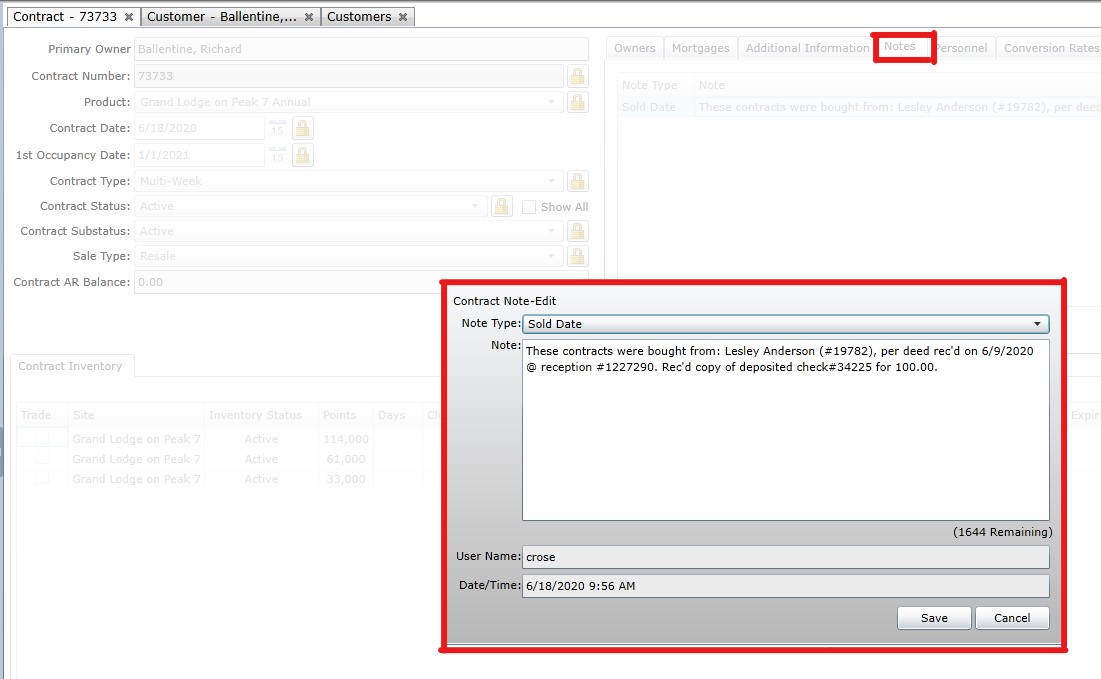
If you need to find previous owner, look in the notes of the contract:
OWNERSHIP TRANSFER
- Owners can transfer their ownership by changing the names on their deed
- Typically parents transferring ownership to children
- Transferred ownership retains Club Benefits
- Exchange Support will consider transferring II membership on case-by-case basis
YEAR-ROUND SKI LOCKERS
Annual Fee: $250
- Purchased through Sales
- Owner’s can opt-out at any time (fee will NOT be prorated or refunded if they have paid for the year)
- ARM is the best fit to handle these conversations. We can reel in Sales MGMT as needed on a case by case basis.
OWNER ACKNOWLEDGEMENT SURVEY
Owner Acknowledgement Survey is initialed and signed by the owner at point of sale to ensure that they understand what they are purchasing.
INTERVAL MEMBERSHIP
- All new contract purchases through BGV are given an Interval International membership enrollment/renewal
- You can find the membership type in Additional Considerations
- Interval International = Basic/Traditional
- CIG = Club Interval Gold
- Exchange Support will add an II Enrollment (new owners) or II Renewal (upgrades) to the owner file once this is completed