
OWNER USAGE SCENARIOS
ADDING USAGE
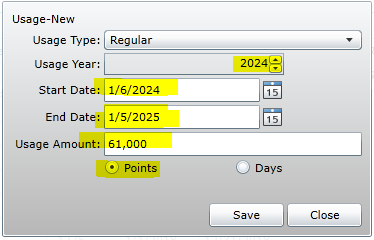
If there is no usage line (typically on new contracts), you must add NEW usage
**Only certain agents have access to adjust usage: tag @Usage Adjustment in the main chat if you need help adding usage**
- Open Contract
- Click on inventory line (ex. Studio)
- Click “New” on the right side
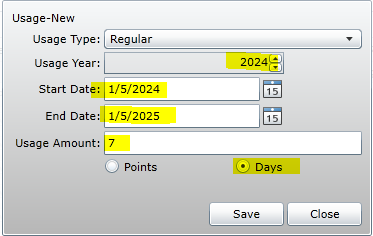
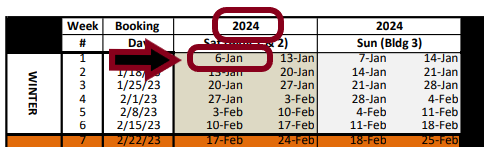
- Add Points or Days Based on Calendar of Weeks Date Range (also known as the Interval)
- First check-in date of the year to last check-out date
ADJUSTING USAGE
If there is an issue with remaining usage, you may need to adjust it in the contract
**Only certain agents have access to adjust usage: tag @Usage Adjustment in the main chat if you need help adjusting usage**
- Open Contract
- Select Unit Size to adjust
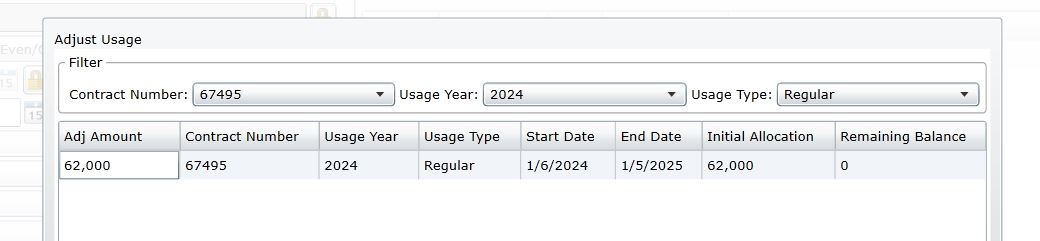
- Click “Adjust”
- Select Contract Number, Usage Year, and Usage Type (Regular)
- Click save
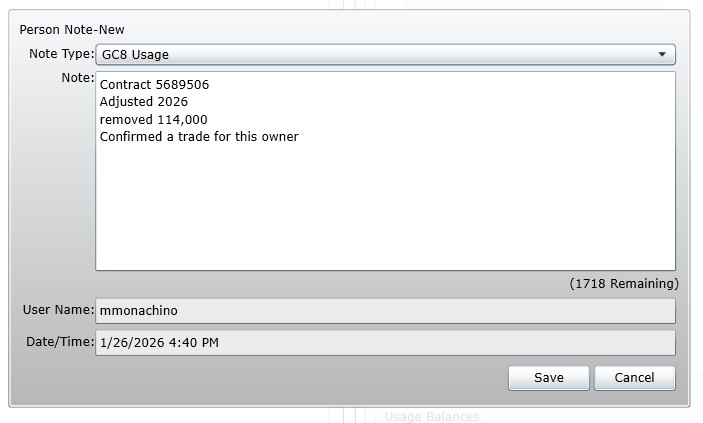
- Add a GC8/GL7/GTL usage note to the owner file
- Include:
- Contract #
- Usage year that was adjusted
- Amount of points that were adjusted
- Why the adjustment was made
- Include:
CXL/UPGRADE USAGE
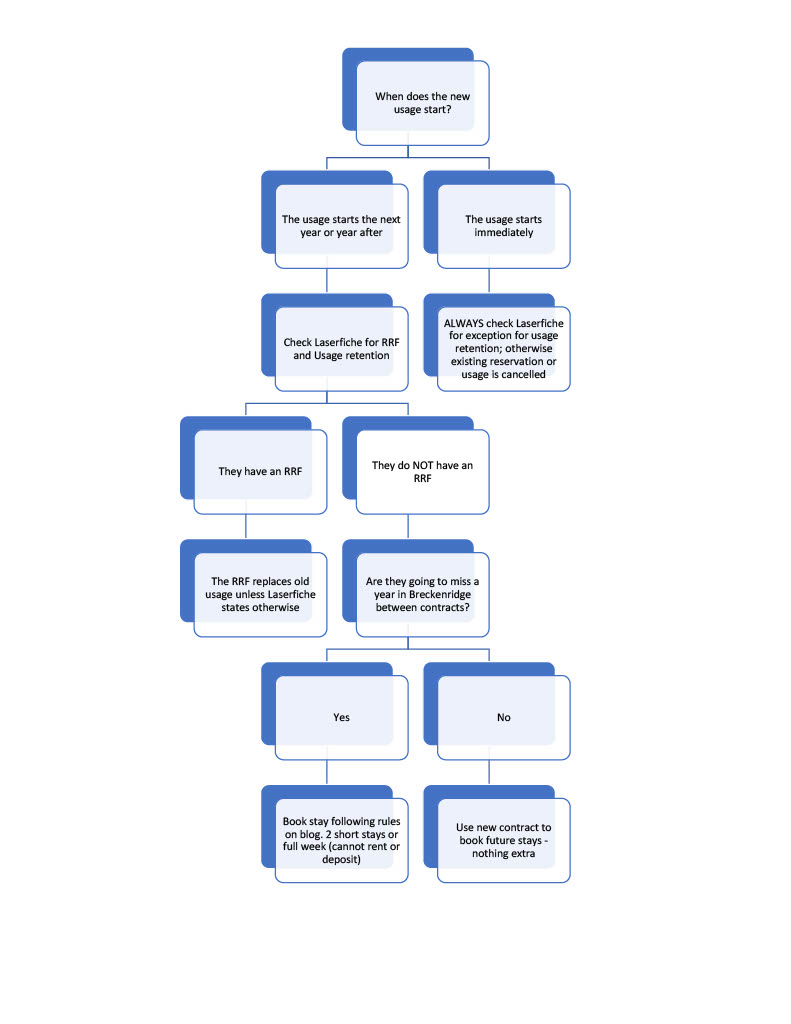
Sometimes an owner may encounter a “gap year” where it’s unclear if they will receive usage while they wait for the new contract to begin.
Example:
- New Contract – First Year Usage 2026
- Cancel/Upgrade Contract – Only Shows Usage through 2024
- This owner will receive “CXL/Upgrade” usage for 2025 (From the old “Cancel/Upgrade” contract)
Rules:
- Cancelled/Upgrade contact will be valid until “First Year of Usage” begins on the NEW contract
- Cannot: put into the rental program, deposit with Interval International
- Can: self-rent/self-manage
Exceptions: Instead of keeping old contract usage, a Sales Agent may provide one of the following
- Developer Week
- RRF Sales Week (20% Sales Week)
*If an owner is given a substitute for a gap year (one of the above), then they may not borrow points from the following year of the cxl/upgrade contract.
DO I OFFER DW, RRF, OR OWNER WEEK?
- Review customer file, worksheet notes, and contracts in Laserfische
- Check Worksheet Notes and/or Laserfische Contract for additional considerations (RRF? Developer week?)
- Review Reservations for Gap Year Reservations
- Review New Contract and Upgraded Contract Usage
BOOKING USAGE IF CONTRACT IS INACTIVE
Cannot be rented or deposited
- Owner Week:
- Must be booked within the season they previously owned
- Booked with type/subtype: Owner/Contract Upgrade Wk
- All normal booking policies apply
- Add “CXL Contract Usage” Note to reservation and owner file
- Short Stay
- Must be booked as a three or four-night stay
- No restriction on season
- Unit size can match old contract or smaller
- Booked with type/subtype: Owner/Contract Upgrade SS
- Must collect $100 admin fee
- All normal booking policies apply
- Add “CXL Contract Usage” Note to reservation and owner file
- If they already have point stays booked or complete:
- 1 Point Stay booked or completed = 1 Contract Upgrade SS
- 2+ Point Stays booked or completed = cannot book anything else
- They can cancel the Point Stays and book Contract Upgrade SS’s
- Must be booked as a three or four-night stay
LOST USAGE
- Education is the most important compensation we can give!
- Approach conversations with empathy, and set the owner up for success for future bookings
- Book next year for them, if possible
- Make sure the owner knows:
- How to access Grand Central
- How to book their weeks online
- When to book their week
- Double-check that we have a good email address on file
OPTIONS:
Points Stays (GL7/GC8)
Interval Compensation
- Bonus Weeks:
- Always available to offer
- Will be around $400 with limited availability
- Add compensation note to owner file
- Developer Weeks
- Depends on developer week count
- Always available for first year of usage
- Interval account must be active to receive (no IOUs)
- Visit the ES page for counts and additional info
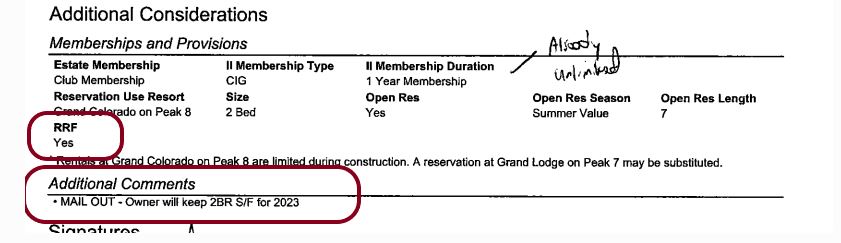
Example of owner with RRF and retained usage:
TRACKING DOWN USAGE
Some things to check if you can’t find an owner’s usage:
- Check past reservations that would have usage – click details to see which contract was used
- Open Contracts and expand the year in question to follow the breadcrumbs of what reservation #’s usage is allocated to.
- Was usage wrongfully returned to the contract?
- Should I look at another year if usage was wrongfully taken?
- Have a piece of paper/calculator handy to follow along
- This could take some time and that is ok!