
Non-Tour Confirmation Emails & Texts
Reservation Confirmation
Initial confirmation emails are manually sent. They are either sent via the More Buttons in TSW or when an owner books Bonus Time or their owner week via Grand Central.
Sent: Immediately after a reservation is confirmed.
Audience: All reservations.
Purpose: Confirms the reservation and provides the essential information needed before arrival.
Includes:
- Reservation details (dates, unit, reservation number)
- Arrival and departure times
- Added amenities (rollaway bed, Pack ‘n Play, high chair, etc.)
- Seasonal welcome message
Primary Actions:
- Celebrate a special occasion
- View resort information
- Plan transportation and parking
- Contact the resort
300-Day Reminder (Fixed Week Owners Only)
Sent: 300 days before arrival.
Audience: Fixed Week owners.
Purpose: Reminds owners of their upcoming reservation and encourages early trip planning.
Includes:
- Reservation details
- Add to Calendar option
- Seasonal welcome message
Primary Actions:
- Add reservation to calendar
- Plan transportation and parking
- Contact the resort
- Celebrate a special occasion
125-Day Reminder (Owner Usage & Exchanges)
Sent: 125 days before arrival.
Audience: Owners using their week or anyone traveling on an exchange.
Purpose: Encourages owners to begin planning their stay and complete pre-arrival tasks.
Includes:
- Reservation details
- Add to Calendar option
- Owner Relations contact information
- Information about self-managed reservations and the rental program
Primary Actions:
- Add reservation to calendar
- Plan transportation and parking
- Contact the resort
- Celebrate a special occasion
90-Day Reminder (Rental Guests)
Sent: 90 days before arrival.
Audience: Rental guests.
Purpose: Encourages guests to begin planning their stay and prepare for arrival.
Includes:
- Reservation details
- Add to Calendar option
Primary Actions:
- Add reservation to calendar
- Plan transportation and parking
- Contact the resort
- Celebrate a special occasion
30-Day Reminder
Sent: 30 days before arrival.
Audience: All reservations.
Purpose: Encourages guests to personalize their stay before arrival.
Includes:
- Reservation details
- Pre-registration link
- Amenity request information
- Rental and exchange disclosures (when applicable)
Primary Actions:
- Add amenities
- Explore resort information
- View local events
- Plan transportation and parking
- Contact the resort
- Celebrate a special occasion
14-Day Reminder
Sent: 14 days before arrival.
Audience: All reservations.
Purpose: Helps guests finalize vacation plans before they arrive.
Includes:
- Seasonal activity recommendations
- Rental and exchange disclosures (when applicable)
Primary Actions:
- Reserve seasonal activities, rentals, or spa services
- View dining recommendations
- Complete pre-registration
- Contact the resort
- Celebrate a special occasion
2-Day Reminder
Sent: 2 days before arrival.
Audience: All reservations.
Purpose: Prepares guests for arrival and encourages online check-in.
Includes:
- Mobile room key information
- Rental and exchange disclosures (when applicable)
- Seasonal arrival information
Primary Actions:
- Complete online check-in
- Explore resort amenities
- Book on-property activities
- Plan transportation and parking
- Contact the resort
- Celebrate a special occasion
Welcome Text
Sent: The day before check-in.
Audience: Guests arriving for an upcoming stay.
Purpose: Welcomes guests before arrival and provides helpful information to make their stay easier.
Includes:
- Personalized welcome message
- Property-specific information and resources
- Links to helpful stay information, such as:
- In-room directory
- Resort activities
- Spa information
- Shuttle information (when applicable)
- Important property updates or operational notices (when applicable)
Notes:
- Content may vary by resort and season.
- Guests can reply STOP to unsubscribe from text messages.
Departure Text
Sent: The day before check-out.
Audience: Guests departing the following day.
Purpose: Provides check-out reminders and helps streamline the departure process.
Includes:
- Check-out time reminder
- Instructions for returning items such as:
- Wristbands
- Ski locker keys
- Room keys (property specific)
- Robes
- Option to text departure confirmation to skip the Front Desk line
Notes:
- Content varies slightly by resort based on property-specific check-out procedures.
Booking Reminder Emails
Booking reminders are emailed to all primary owners within one week of the start of each new booking season.
Usage reminders are emailed to primary owners after a booking season has ended if they have not yet reserved their Owner Week for that season.
GC8
Subject: Book Your Winter (Usage Year) Owner Week Online!
Preheader: You will have access to book your owner week online
Book Your (Season) (Usage Year) Owner Week Online
Contains:
- The date of the first booking day of the season for 3/4 bed and 2 bed owners
- The time that they can begin booking on those dates (9 a.m. MT)
- A reminder to book on online with a link to the tutorials
- How to create a Grand Central account and reminder to check that they can log in prior to the booking morning
- A table of the winter weeks w/booking days and links to each booking day calendar reminder
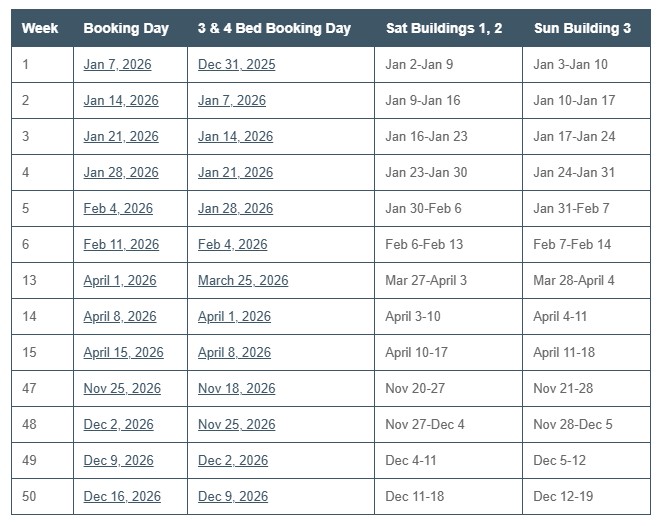
Buttons to:
- GRAND CENTRAL: Grand Central login page
- FAQs: Online owner week reservation system FAQ page
- CONNECT: clicking on this opens an email to customerservice@breckgv.com **this link may not function on your work laptop unless you change your settings, it is not broken :-)**
- REGISTER: How to create a Grand Central account tutorial
GL7
Subject: Book Your (Usage Year) (Season) Owner Week at the Grand Lodge on Peak 7 Online
Preheader: Access to book your (Usage Year) owner week is opening soon online
Book Your (Season) (Usage Year) Owner Week Online
Contains:
- The date of the first booking day of the season for 3/4 bed and 2 bed owners
- The time that they can begin booking on those dates (9 a.m. MT)
- A reminder to book on online with a link to the tutorials
- How to create a Grand Central account and reminder to check that they can log in prior to the booking morning
- A table of the winter weeks w/booking days and links to each booking day calendar reminder
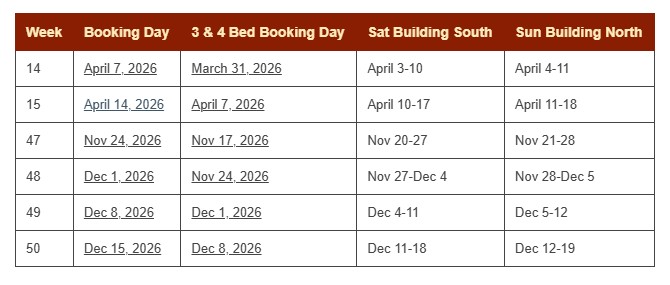
Buttons to:
- GRAND CENTRAL: Grand Central login page
- FAQs: Online owner week reservation system FAQ page
- CONNECT: clicking this button on mobile device calls OR
- REGISTER: How to create a Grand Central account tutorial
GTL
**This email only goes out to Spring/Fall owners as the winter and summer owners participate in BIGVARS
Subject: Book Your (Usage Year) Spring & Fall Owner Week at Grand Timber Lodge Online April 18, 2026
Preheader: Your (Usage Year) Owner Week will be available to book online THIS SATURDAY!
Book Your (Usage Year) Spring & Fall Owner Week Online
Contains:
- The date of the S/F booking day
- The time that they can begin booking on that day (9 a.m. MT)
- Reminder that we have moved to an online booking system
- Tips for booking and links to tutorials and FAQs
- Contact info for OR
Buttons to:
- GRAND CENTRAL: Grand Central login page
- TUTORIALS: Owner week tutorial page
- REGISTER: How to create a Grand Central account tutorial
New Owner Emails
Welcome Email
New Owner
Subject: Make the Most of Your Ownership
Preheader: You now have access to the exclusive owner’s portal, Grand Central
Register. Reserve. Enjoy
Contains:
- Welcome to the BGV family
- Copy: prompt to access/register for Grand Central (includes owner number). Information about booking owner week.
- REGISTER NOW button: links to Grand Central registration
Buttons To:
- OWNERSHIP TUTORIALS
- SCHEDULE CALL: Schedule New Owner Welcome call with SOS
- CONNECT: Email customerservice@breckgv.com
- QUICK GUIDE
- BGVARM: Email bgvarm@breckgv.com
Upgraded Owner
Subject: Thank You for Creating More Grand Memories With Us
Preheader: It’s an honor that you have chosen to keep building a lifetime of memories with us.
Thank You for Creating More Grand Memories With Us
Contains:
- Thank you for continuing to build memories with BGV, thank you for purchasing
- From sales agent
Resale Owner
Subject: Make the Most of Your Ownership
Preheader: You now have access to the exclusive owner’s portal, Grand Central.
Make the Most of Your Ownership
Contains:
- Welcome to the BGV family
- Copy: prompt to access/register for Grand Central (includes owner number). Information about booking owner week.
- REGISTER NOW button: links to Grand Central registration
Buttons To:
- BOOKING DAYS
- SCHEDULE CALL: Schedule New Owner Welcome call with SOS
- CONNECT: Email customerservice@breckgv.com
- QUICK GUIDE
- BGVARM: Email bgvarm@breckgv.com
10 Day
Subject: Make the Most of Your Ownership
Preheader: You now have access to the exclusive owner’s portal, Grand Central
Register. Reserve. Enjoy
Contains:
- Welcome to the BGV family
- Copy: prompt to access/register for Grand Central (includes owner number). Information about booking owner week.
- REGISTER NOW button: links to Grand Central registration
Buttons To:
- OWNERSHIP TUTORIALS
- SCHEDULE CALL: Schedule New Owner Welcome call with SOS
- CONNECT: Email customerservice@breckgv.com
- QUICK GUIDE
- BGVARM: Email bgvarm@breckgv.com
4 Month
Subject: Get to Know Your Grand Colorado on Peak 8 Ownership
Preheader: Enjoy Breckenridge or travel the world with your ownership perks.
Enjoy the Privileges of Your Exclusive Ownership
Contains:
- Information about Club Benefits: resort access, day use, bonus time, theaters, club points
Buttons To:
- Rental Program
- Interval International
- Connect: Email customerservice@breckgv.com
- Dog Policy
- BGVARM: Email bgvarm@breckgv.com
8 Month
Subject: Grand Ownership Discounts Just for You
Preheader: Enjoy discounts that will save you time and money while you build a lifetime of memories
Grand Discounts Just for You
Contains:
- Copy about exclusive owner discounts
Buttons To:
- Rental Information: Contract season specific (winter/spring/fall: ski rentals, summer: bike rentals)
- Activity Discounts
- Shuttle Discounts
- Owner Rental Discounts
- Connect: Email customerservice@breckgv.com
- Quick Guide
- BGVARM: Email bgvarm@breckgv.com
Grand Central Emails
Day Use
Day Use Confirmation
- Subject: GL7 Day Use Parking Confirmation: (DATE)
- Confirms Day Use reservation date, hours of Day Use (8am-10pm)
- Buttons: CANCEL DAY USE, BOOK SPA, ACTIVITIES, BOOK THEATER
- Day Use Terms & Conditions
Day Use Waitlist
- Subject: GTL Parking Waitlist Confirmation for (DATE)
- Confirms the date the owner has been added to waitlist. If confirmed, they will receive a confirmation email. Prompt to check Grand Central for status or to cancel waitlist.
- Day Use Terms & Conditions
- CHECK WAITLIST STATUS button
Day Use Cancellation
- Subject: Your (DATE) Parking Reservation Has Been Cancelled
- Your Day Use Parking reservation for has been cancelled.
- BOOK MORE button
Day Use Parking Restriction: Late Cancel
- Subject: A Parking Restriction Has Been Placed On Your Account
- Explains reason for restriction (must cancel before 7 p.m. the night prior) and 14-day restriction.
- CONTACT US button: calls Front Desk
Day Use Parking Restriction: No Show
- Subject: A Parking Restriction Has Been Placed On Your Account
- Explains reason for restriction (no-show) and 14-day restriction.
- CONTACT US button: calls Front Desk
Theaters
Theater Confirmation
- Subject: Your (DATE) Movie Theater Is Booked
- Confirms date of theater booking, prompt to sign waiver, explains theater keys must be checked out at Front Desk.
- SIGN WAIVER button
- Theater Reservation Details: date, time, theater number
- Movie List: GC8, GL7, GTL
- Theater Policies
Theater Cancellation
- Subject: Your Theater For (DATE) Has Been Cancelled
- Your theater reservation for (DATE) has been cancelled.
- BOOK MORE button
Theater Policies
- No-show Policy: If you do not show up for your theater reservation within 15 minutes we will assume that you no longer want to use the theater and will release it to other owners.
- Cancellation Policy: If you need to cancel your theater reservation, please do so by calling the Front Desk. Please note that although there is no penalty for not fulfilling your reservation, if you do cancel it we can re-assign it to someone on our in-house waiting list.
- Pet Policy: Pets are prohibited from all common areas, including elevators, aquatics, fitness center, spa facilities, movie theaters and the lobby. Pets cannot be left unattended inside vehicles on resort property, including in the parking garages. Failure to abide by these rules will result in a fine being assessed.
- Age requirements: Children 15 and up may use the theaters without parental supervision. There are, however, “R” and “NC17” rated movies available, so parents, please take note of this.
- Potential Fees: There is no cost for reserving the theaters. In addition, each theater receives a complimentary clean from our Housekeeping staff between reservations in order to ensure the best possible experience for our owners and guests. However, a cleaning fee of $50 will be assessed and charged to the credit card on file if excessive cleaning is required after use. Please let the Front Desk staff know immediately if the theater is not clean upon your arrival.
Login Help
Forgot Username
- Subject: Grand Central Username Request
- We have received a request to send you all Grand Central usernames associated with this email address. Account Usernames: (username)
- LOGIN NOW button
Forgot Password
- Subject: Grand Central Password Reset Request
- Copy explains we received request to reset password, click reset password button. Reset link expires within 4 hours.
- RESET PASSWORD button: unique link
Password Updated
- Subject: Your Grand Central Password Hass Been Updated
- Copy confirms password has been updated. Prompts owner to contact OR if they did not initiate the password reset.
Contact Info Updated
- Subject: Your Grand Central Contact Information Has Been Updated
- Your contact information for your ownership has been updated (Ownership->Account)
- LOGIN NOW button
Account Created (via Owner)
- Subject: Your Grand Central Account Has Been Created
- Your account has been created, contact OR if incorrect
- LOGIN NOW button
Account Created (via Backoffice/Umbraco)
- Subject: Your Grand Central Account Has Been Created
- A new account has been created for you at Grand Central and a temporary password has been assigned.
- Temporary Password
-
Please change your password upon login by going to Ownership, Accounts and Change Password.
- LOGIN NOW button
Trade Forum
Trade Posted
- Subject: Your Trade Is Approved
- Thank you for participating, your trade is approved
- Your Trade Forum Post Details: resort, unit size, check-in date
- Contact OR if you find a trade so we can finalize; OR contact information and hours
- VIEW TRADE FORUM button
Trade Response
- Subject: You Have a Trade Response
- Your Trade Forum Details: resort, unit size, check-in date
- Response From, Contact, Message
- If you would like to trade weeks with this owner:
- Please contact the owner at to confirm you would like to trade weeks.
- Next, both owners will the need to contact Owner Relations at 877-453-4440 or by email to confirm they want to trade weeks.
- Then, our Owner Relations team will complete the trade and send both owners a new confirmation email with the updated reservations.
- VIEW TRADE FORUM button
Account Delinquency
If an owner books their owner week via Grand Central while HOA/Mortgage delinquent, they will receive the following email.
- Subject: URGENT: BGV Account Delinquency
- Reservation (RES NUMBER) for (DATE), was made while your account was delinquent. Per Breckenridge Grand Vacations and HOA policies, owners past due on any financial obligation cannot make new or utilize pre-existing reservations. You have agreed to the following terms and conditions: This reservation was made while your account was delinquent. Reservation (RES NUMBER) will be forfeited if the account does not become current within one business day. Please contact BGV Accounts Receivable at 888-783-8883 ext. 3048 or at BGVARM@Breckgv.com between 9 a.m. – 4:45 p.m. MT Monday – Friday to resolve any past due financial accounts.
- CONTACT BGVARM button: emails bgvarm@breckgv.com